Node.js Application Vulnerabilities: Risks and Protection Strategies
Node.js applications face unique risks because the entire application runs in a single process, meaning one flaw can compromise the whole system.
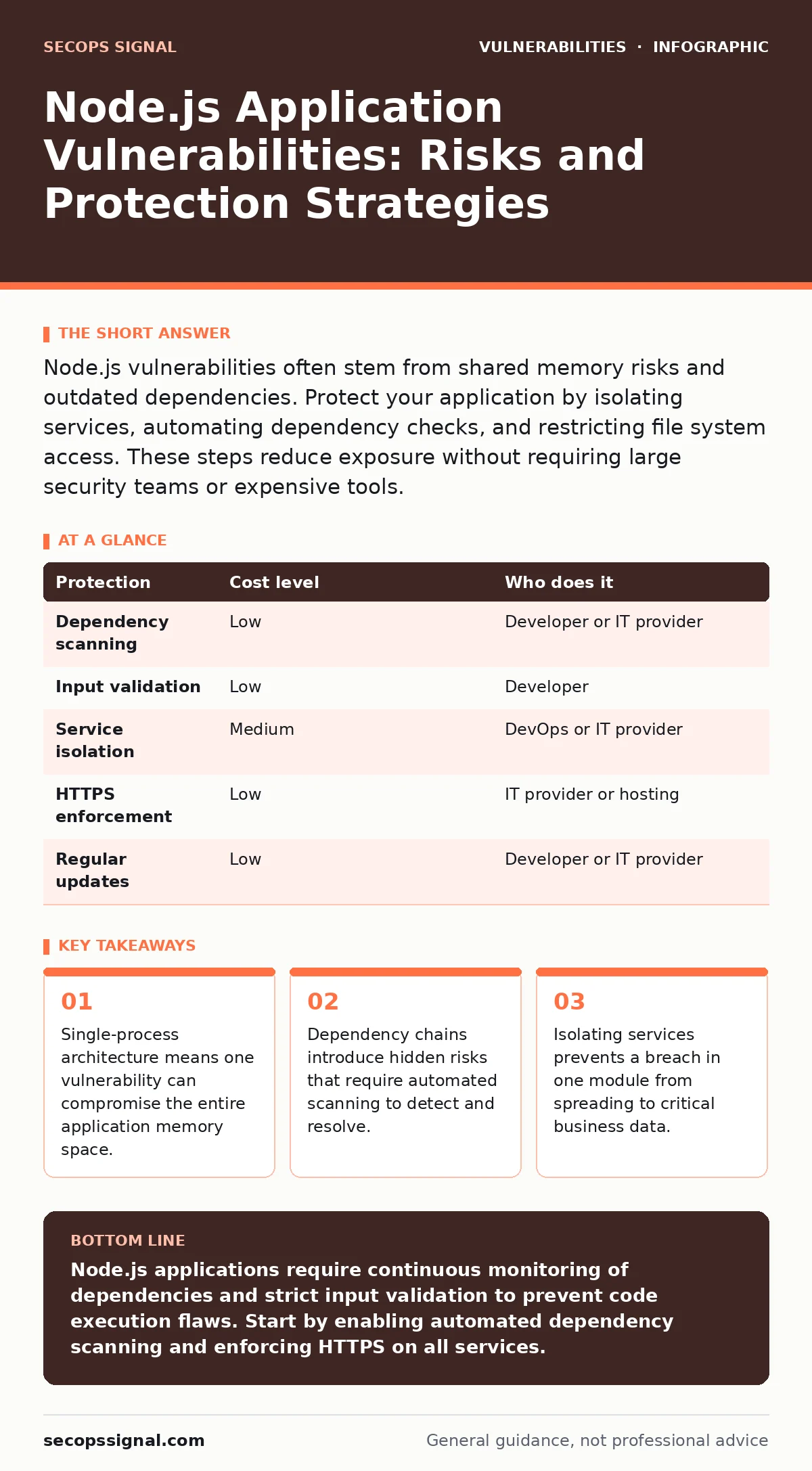
Node.js vulnerabilities often stem from shared memory risks and outdated dependencies. Protect your application by isolating services, automating dependency checks, and restricting file system access. These steps reduce exposure without requiring large security teams or expensive tools.
How Node.js Architecture Increases Risk
Node.js applications run on a single-threaded event loop. This design allows the application to handle many connections efficiently. It also creates a single point of failure for memory safety. When one part of the application crashes or is compromised, the entire process stops or becomes accessible to an attacker.
Traditional multi-threaded applications isolate tasks in separate memory spaces. Node.js shares the heap. A buffer overflow in one module can overwrite data in another. This is why out-of-bounds write vulnerabilities are particularly dangerous in this environment. Even if the flaw is in a minor utility function, the attacker can manipulate the main application logic.
You must treat the entire application as a single security boundary. Standard web firewalls cannot see inside the process. If an attacker injects code that runs in the same context as your database driver, network filters offer no protection. The application itself must validate every input before processing it.
The Hidden Cost of Dependencies
Node.js relies heavily on the npm registry for packages. Most applications use hundreds of external libraries. Each library may depend on other libraries. This creates a deep dependency tree. A vulnerability in a package three levels deep affects your application just as much as a flaw in your own code.
Maintaining these dependencies is difficult for small teams. You cannot manually review every update. Attackers often publish malicious packages with names similar to popular ones. These typosquatting packages look legitimate but contain code that steals credentials or installs backdoors.
Automated scanning is necessary to manage this risk. You need tools that check not just direct dependencies, but also transitive ones. This process identifies known flaws before they reach production. It also alerts you when a maintainer abandons a package, leaving it vulnerable to future attacks. Regular updates are not optional; they are a continuous maintenance task.
Protecting Against Code Injection
Code injection remains the most common threat to Node.js applications. Attackers send crafted input that the application executes as code. This often happens when developers use functions like eval() or pass user data directly to database queries without sanitization.
SQL injection allows attackers to read or modify database records. Command injection lets them run system commands on the server. Both exploit the trust the application places in user input. You must assume all input is hostile.
Use parameterized queries for all database interactions. This ensures the database treats input as data, not as executable code. For template engines, use auto-escaping features. These features convert special characters into safe text. Never concatenate user input into strings that will be executed. This simple rule prevents the majority of injection attacks.
Isolating Services to Limit Damage
When one service fails, it should not take down the entire business. Monolithic Node.js applications are hard to isolate. If the authentication module is compromised, the attacker has the same privileges as the payment module.
Microservices architecture solves this by splitting the application into smaller, independent units. Each service runs in its own process or container. A breach in the blog service does not grant access to the customer database. This isolation limits the blast radius of any attack.
Containers provide a lightweight way to achieve this isolation. You can define strict resource limits for each container. If a container crashes or consumes too much memory, it does not affect others. Container image scanning ensures that the base images used for these services do not contain known vulnerabilities. This adds a layer of defense before the code even runs.
Low-Cost Protections for Small Teams
You do not need a large budget to secure a Node.js application. Many effective measures are free or low-cost. The key is consistency. Implementing these steps creates a strong baseline that reduces the likelihood of successful attacks.
| Protection | Cost level | Who does it |
|---|---|---|
| Dependency scanning | Low | Developer or IT provider |
| Input validation | Low | Developer |
| Service isolation | Medium | DevOps or IT provider |
| HTTPS enforcement | Low | IT provider or hosting |
| Regular updates | Low | Developer or IT provider |
Automated dependency scanning tools are often free for open-source projects. Many hosting providers offer built-in security features. Enforcing HTTPS ensures data is encrypted in transit. This prevents eavesdropping on network connections. It is a standard practice that most browsers now require.
What to Ask Your IT Provider
If you outsource your IT, you must verify their security practices. Many providers focus on uptime and ignore security. You need to ensure they treat vulnerabilities as a priority. Do not assume they are checking for flaws just because they manage the servers.
Ask these specific questions to evaluate their capability:
- How do you scan for vulnerabilities in third-party libraries?
- What is your process for applying security patches to Node.js applications?
- Do you isolate different services or run everything in one container?
- How do you monitor for unusual activity in the application logs?
- Can you demonstrate how you test for injection flaws?
A provider who cannot answer these questions clearly is not managing your security risks. They may be focusing on convenience rather than safety. You need a partner who understands the specific threats facing Node.js applications.
Balancing Security and Development Speed
Security measures can slow down development. Scanning and updating dependencies takes time. Isolating services adds complexity. Small teams often skip these steps to ship features faster. This creates technical debt that becomes a security risk.
You must integrate security into the development workflow. Do not treat it as a final step before launch. Automated checks should run with every code change. This catches issues early when they are cheap to fix. It also prevents vulnerabilities from accumulating.
Compensating controls can help when you cannot fix a flaw immediately. For example, if a vulnerability exists in a library, you can restrict access to that part of the application until a patch is available. This buys time without leaving the system completely exposed. It is a temporary measure, but it reduces immediate risk.
Managing Authentication Risks
Authentication flaws allow attackers to impersonate legitimate users. Authentication bypass vulnerabilities can occur if the application trusts client-side data for access control. Never store sensitive tokens in client-side storage without proper validation.
Use established authentication protocols. Do not build your own cryptographic functions. Standard libraries have been tested by many experts. They are less likely to contain hidden flaws. Ensure that session tokens expire after a reasonable time. This limits the window of opportunity for an attacker who steals a token.
HTTP security headers provide an extra layer of protection. These headers instruct the browser on how to handle responses. They can prevent clickjacking and enforce strict content policies. Configuring these headers correctly reduces the attack surface of your web application. It is a simple configuration change that adds significant value.
Key takeaways
- Single-process architecture means one vulnerability can compromise the entire application memory space.
- Dependency chains introduce hidden risks that require automated scanning to detect and resolve.
- Isolating services prevents a breach in one module from spreading to critical business data.
Node.js applications require continuous monitoring of dependencies and strict input validation to prevent code execution flaws. Start by enabling automated dependency scanning and enforcing HTTPS on all services.
Frequently asked questions
How often should I update Node.js packages?
Update packages regularly, ideally as part of every release cycle. Automated tools can alert you to critical vulnerabilities that require immediate patching. Delaying updates increases the risk of exploitation.
Is it safe to use free npm packages?
Free packages are safe if they are well-maintained and have few dependencies. Always check the package popularity and maintenance status. Avoid obscure packages with no recent updates or low download counts.
Can a firewall stop Node.js application attacks?
A firewall blocks network traffic but cannot inspect application logic. It cannot stop code injection or flaws in how the application processes data. You must secure the code and dependencies separately.
What is the biggest risk for small Node.js apps?
The biggest risk is unpatched dependencies. Small teams often neglect updating libraries, leaving known vulnerabilities exposed. Automated scanning and regular updates mitigate this specific risk effectively.
How this guide was produced: written by the SecOps Signal editorial team with AI assistance, checked against the public references listed below, and reviewed when the facts change. See our editorial policy or report an error.