Session Fixation Explained: How Attackers Hijack Your Login
Attackers can force you to use a pre-set identifier, allowing them to enter your account the moment you log in without knowing your password.
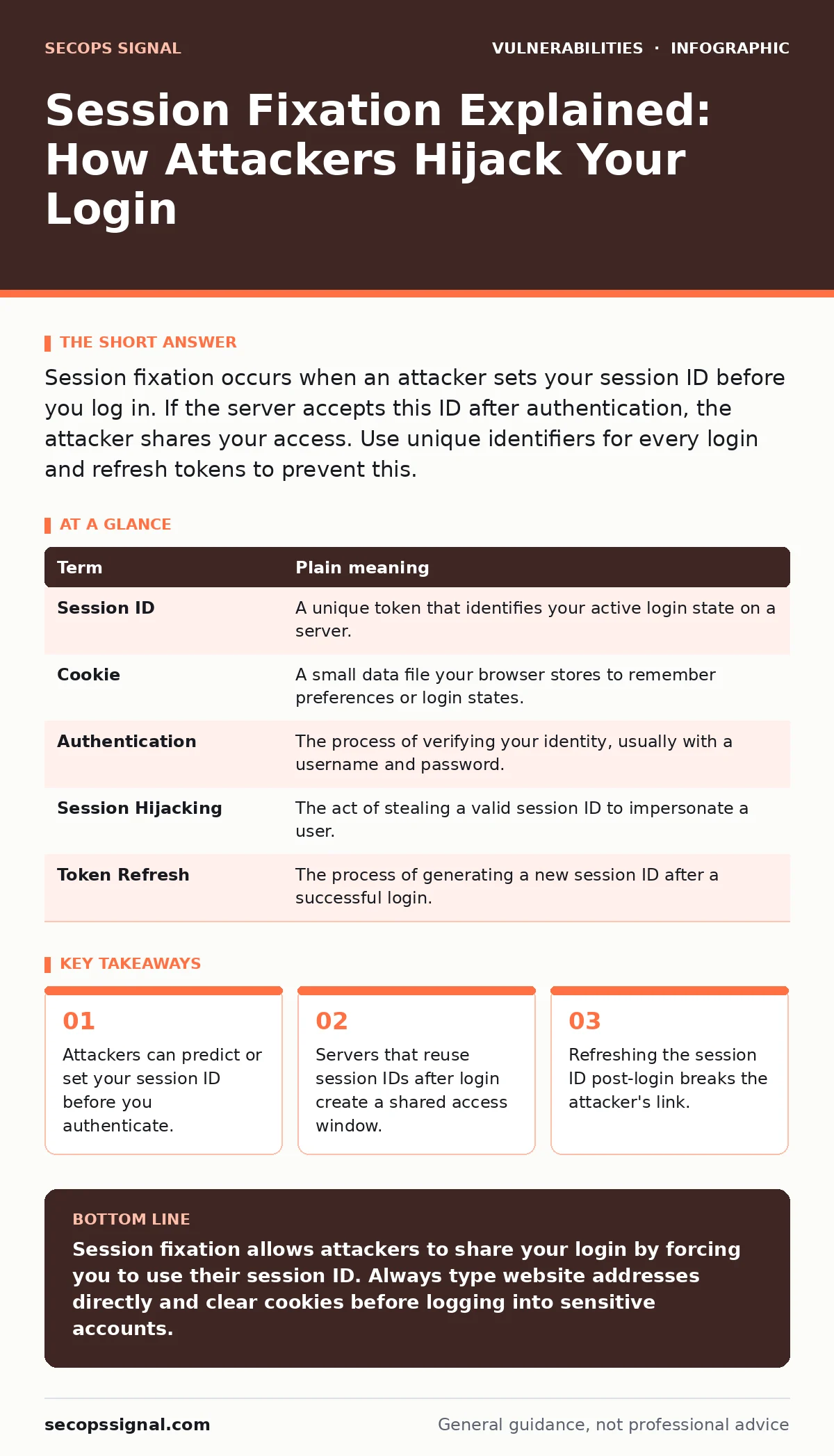
Session fixation occurs when an attacker sets your session ID before you log in. If the server accepts this ID after authentication, the attacker shares your access. Use unique identifiers for every login and refresh tokens to prevent this.
The Stolen Hotel Key Card
Imagine you are staying at a hotel. The front desk gives you a key card to access your room. Now suppose a stranger hands you a key card before you check in, telling you to use it. You hand it to the clerk, who punches it in and activates it for your stay. Because the clerk did not give you a new card, the stranger still has a working copy. They can enter your room anytime. This is the core mechanic of session fixation. It relies on the server failing to issue a new identifier after you prove who you are.
What Is a Session ID?
When you log into a website, your browser and the server start a conversation. To remember you are logged in, the server assigns a session ID. This is a long, random string of characters. Your browser stores this ID in a cookie, which is a small file saved on your device. Every time you click a link, your browser sends this cookie back to the server. The server checks the ID against its list of active users. If it matches, it grants access.
| Term | Plain meaning |
|---|---|
| Session ID | A unique token that identifies your active login state on a server. |
| Cookie | A small data file your browser stores to remember preferences or login states. |
| Authentication | The process of verifying your identity, usually with a username and password. |
| Session Hijacking | The act of stealing a valid session ID to impersonate a user. |
| Token Refresh | The process of generating a new session ID after a successful login. |
How Fixation Differs From Hijacking
Most security advice focuses on session hijacking, where an attacker steals your ID while you are already logged in. This usually happens through network eavesdropping or malicious scripts. Session fixation is different. The attacker does not steal your ID. Instead, they give it to you. They craft a link containing a specific session ID and send it to you. When you click the link, your browser accepts that ID. You then log in normally. The server sees the ID you are using and assumes it is valid for your authenticated state. The attacker now shares your session.
The Server’s Critical Mistake
The vulnerability exists on the server side, not yours. A secure server treats the login event as a boundary. Before you log in, you are an anonymous guest. After you log in, you are an authenticated user. The server should issue a brand-new session ID at this transition. If the server allows the old ID to remain valid, it creates a bridge for the attacker. This mistake is common in older applications or those with poor configuration. It is a specific type of vulnerability prioritization issue where developers overlook the state change between guest and user.
Why This Matters for Ordinary Users
You might assume that strong passwords protect you from this. They do not. The attacker does not need your password. They only need you to log in using their ID. If you are logged into a banking site or an email provider, the attacker gains immediate access. They can read messages, transfer funds, or change settings. This risk applies to any site that uses cookie-based sessions. It is a hidden cost of convenience. The browser remembers you to save you time, but it also creates a persistent state that can be manipulated.
Breaking the Link with Token Refresh
The defense is simple in theory but requires proper implementation. The server must generate a new session ID immediately after successful authentication. This is called token refresh. It invalidates the old ID. Even if the attacker had a copy, it becomes useless. You cannot force a server to do this, but you can encourage good behavior. Clearing your cookies regularly forces a new session ID for every visit. This breaks any fixation attempts because the attacker’s ID is deleted from your browser. It is a manual form of HTTP security headers management, ensuring your client side is clean.
Simple Safety Habits
You can reduce your exposure with three specific actions. First, never click login links in emails or messages. Type the website address directly into your browser. This ensures you start with a clean session generated by the server, not one provided by a third party. Second, use a browser that supports isolated storage for sensitive sites. This prevents cookies from leaking between tabs. Third, log out when you are done. While this does not prevent fixation on the next visit, it limits the window of opportunity if a session is compromised.
- Type the URL directly instead of clicking links.
- Clear cookies before accessing high-value accounts.
- Log out explicitly after using shared or public computers.
The Broader Security Context
Session fixation is a logic flaw. It is not a bug in the code syntax, but a failure in the security model. This is why vulnerability scanning tools often miss it. Scanners look for known code patterns, not logical gaps in user flow. Developers must understand risk-based vulnerability management to identify these state-transition errors. For you, the user, the lesson is about trust. Do not trust the state your browser remembers. Trust the state the server creates fresh for you. This mindset protects you against subdomain takeover risks as well, where attackers exploit misconfigured DNS settings to serve malicious content.
Key takeaways
- Attackers can predict or set your session ID before you authenticate.
- Servers that reuse session IDs after login create a shared access window.
- Refreshing the session ID post-login breaks the attacker's link.
Session fixation allows attackers to share your login by forcing you to use their session ID. Always type website addresses directly and clear cookies before logging into sensitive accounts.
Frequently asked questions
Does using a password manager prevent session fixation?
No. Password managers store credentials, but they do not control the session ID the server assigns. The vulnerability lies in the server's handling of the ID, not how you enter your password.
Can I detect if my session has been fixed?
Not easily. The session appears normal to you. The only sign is unexpected activity in your account, such as password changes or unauthorized logins from other locations.
Is this common in modern web applications?
It is less common than it used to be. Modern frameworks often handle session rotation automatically. However, custom-built applications and legacy systems may still contain this flaw.
What is the difference between this and cross-site scripting?
Cross-site scripting involves injecting malicious code into a website. Session fixation involves manipulating the session identifier. Both can lead to account takeover, but they use different mechanisms.
How this guide was produced: written by the SecOps Signal editorial team with AI assistance, checked against the public references listed below, and reviewed when the facts change. See our editorial policy or report an error.