Container Image Scanning: 6 Misconceptions That Leave Gaps
Scanning detects known vulnerabilities in static files but cannot verify runtime behavior, network exposure, or the safety of secrets embedded within layers.
Container image scanning checks static files for known vulnerabilities before deployment. It does not detect runtime exploits, validate network rules, or prevent secret leakage if keys are baked into the image. You must combine static analysis with runtime protection and strict build hygiene to secure your cloud environment effectively.
Misreading: Scanning Guarantees Runtime Safety
Scanning tools analyze the static contents of a container image file. They compare installed packages against databases of known vulnerabilities. This process happens before the container starts. It cannot predict how the container will behave once it is running on a host. A clean scan result means the image contains no known vulnerable libraries at build time. It does not mean the running process is secure against exploitation.
Runtime behavior depends on the host kernel, the container runtime, and external network traffic. An attacker might exploit a vulnerability in the container runtime itself. They might also exploit a race condition that only occurs under specific load. Static scanning cannot detect these dynamic threats. You need runtime protection to monitor process behavior and system calls. This complements the static check provided by image scanning.
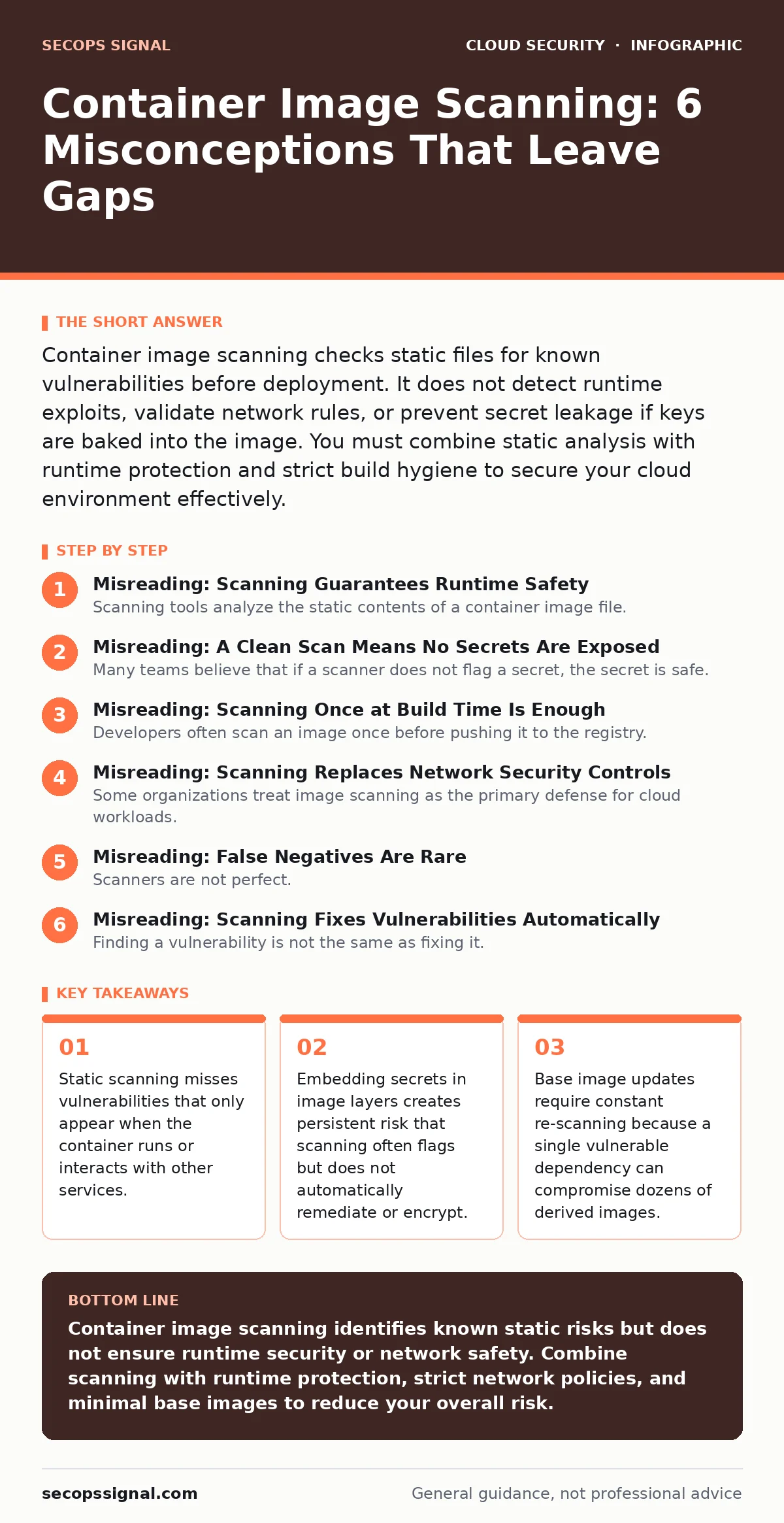
Misreading: A Clean Scan Means No Secrets Are Exposed
Many teams believe that if a scanner does not flag a secret, the secret is safe. This is incorrect. Scanners look for patterns that match known secret formats. They might miss custom tokens, encrypted keys, or secrets stored in environment variables that are not visible in the image layers. Even if a scanner finds a secret, it often only reports it. It does not automatically rotate the key or remove it from the image history.
Secrets baked into image layers persist even if you delete the file in a later layer. The layer remains part of the image history. Anyone with access to the image repository can extract the secret. You should use external secret management systems. These systems inject secrets at runtime. This keeps them out of the image entirely. Refer to our guide on just-in-time access for methods that grant temporary credentials instead of storing long-lived keys.
Misreading: Scanning Once at Build Time Is Enough
Developers often scan an image once before pushing it to the registry. They assume the image remains secure indefinitely. This ignores the changing nature of threat intelligence. New vulnerabilities are discovered daily. A package that was safe last week might have a critical flaw today. If you do not re-scan existing images in your registry, you may deploy vulnerable containers without knowing it.
Continuous scanning is required for stored images. Your registry should trigger a re-scan whenever a new vulnerability is published. This ensures that images sitting in your library do not become stale risks. You must also scan during the pull phase. The environment at pull time might differ from build time. Network policies and host configurations change. Scanning at multiple stages catches drift between the build artifact and the runtime environment.
Misreading: Scanning Replaces Network Security Controls
Some organizations treat image scanning as the primary defense for cloud workloads. They assume that if the image is clean, the workload is secure. This view ignores the network surface area. A container might run perfectly secure code. However, if it is exposed to the public internet without proper filtering, it will be attacked. Scanning cannot fix open ports or permissive firewall rules.
You must enforce strict network segmentation. Use cloud security groups to limit inbound and outbound traffic. Only allow connections from trusted sources. Even a perfectly scanned image can be compromised if it can communicate with a malicious host. Network controls provide a second layer of defense. They limit the blast radius of any successful attack. Do not rely on application-level security alone.
Misreading: False Negatives Are Rare
Scanners are not perfect. They miss vulnerabilities for several reasons. Some vulnerabilities do not have a known identifier yet. These are called zero-day vulnerabilities. Scanners cannot detect them because there is no record of them. Other scanners miss vulnerabilities in custom-built binaries. They only check known package managers. If you compile your own software, the scanner might not analyze the resulting binary.
You must accept that scanning will miss things. Treat scanning as one control in a broader strategy. Combine it with runtime application self-protection. Use threat modeling to identify risks that scanners cannot see. Assume that some vulnerabilities will slip through. Design your architecture to limit damage. This approach is known as defense in depth. It acknowledges the limits of automated tools.
Misreading: Scanning Fixes Vulnerabilities Automatically
Finding a vulnerability is not the same as fixing it. Scanners report issues. They do not rebuild your image. They do not update your dependencies. The responsibility for remediation lies with the development team. If you ignore scan results, the vulnerabilities remain. They accumulate over time. This creates technical debt that becomes harder to fix later.
Integrate scanning into your build pipeline. Fail the build if critical vulnerabilities are found. This forces developers to address issues before deployment. Do not allow bypasses for convenience. Each bypass increases risk. Automate the update of base images. Use infrastructure-as-code to manage dependencies. This reduces manual effort. See our guide on infrastructure-as-code misconfigurations for best practices on managing build definitions securely.
Misreading: Base Image Choice Does Not Matter
Many teams use large, general-purpose base images. These images contain many packages. Each package is a potential attack vector. A larger image has a larger attack surface. Scanners will find more vulnerabilities in these images. Fixing them takes more time. Using minimal base images reduces the number of packages. This reduces the number of potential vulnerabilities.
Choose a base image that contains only what you need. Alpine or distroless images are good examples. They have few packages. They are harder to exploit. Update these base images frequently. Even minimal images receive security patches. Your derived images inherit these updates. Regularly rebuild your images from the latest base. This ensures you benefit from security improvements.
Key takeaways
- Static scanning misses vulnerabilities that only appear when the container runs or interacts with other services.
- Embedding secrets in image layers creates persistent risk that scanning often flags but does not automatically remediate or encrypt.
- Base image updates require constant re-scanning because a single vulnerable dependency can compromise dozens of derived images.
Container image scanning identifies known static risks but does not ensure runtime security or network safety. Combine scanning with runtime protection, strict network policies, and minimal base images to reduce your overall risk.
Frequently asked questions
Does container image scanning detect malware?
Some scanners include malware detection features. They look for known malicious binaries. However, they are not antivirus software. They might miss new or custom malware. Use dedicated malware scanning tools for comprehensive protection.
How often should I re-scan my container images?
You should re-scan images continuously. Trigger re-scans when new vulnerabilities are published. Also scan when you pull images for deployment. This ensures you catch newly discovered flaws in stored images.
Can I use scanning for on-premise containers?
Yes. Scanning works for any container image. It does not depend on cloud providers. You can run scanners on-premise or in hybrid environments. The principles of static analysis remain the same.
What is the difference between image scanning and runtime scanning?
Image scanning checks the static file before it runs. Runtime scanning monitors the running container. It checks for suspicious behavior. Both are needed for full protection.
How this guide was produced: written by the SecOps Signal editorial team with AI assistance, checked against the public references listed below, and reviewed when the facts change. See our editorial policy or report an error.