How Parameterized Queries Stop SQL Injection Attacks
Parameterized queries separate code from data by forcing the database to treat user input as literal values, making it impossible for an attacker to inject malicious commands.
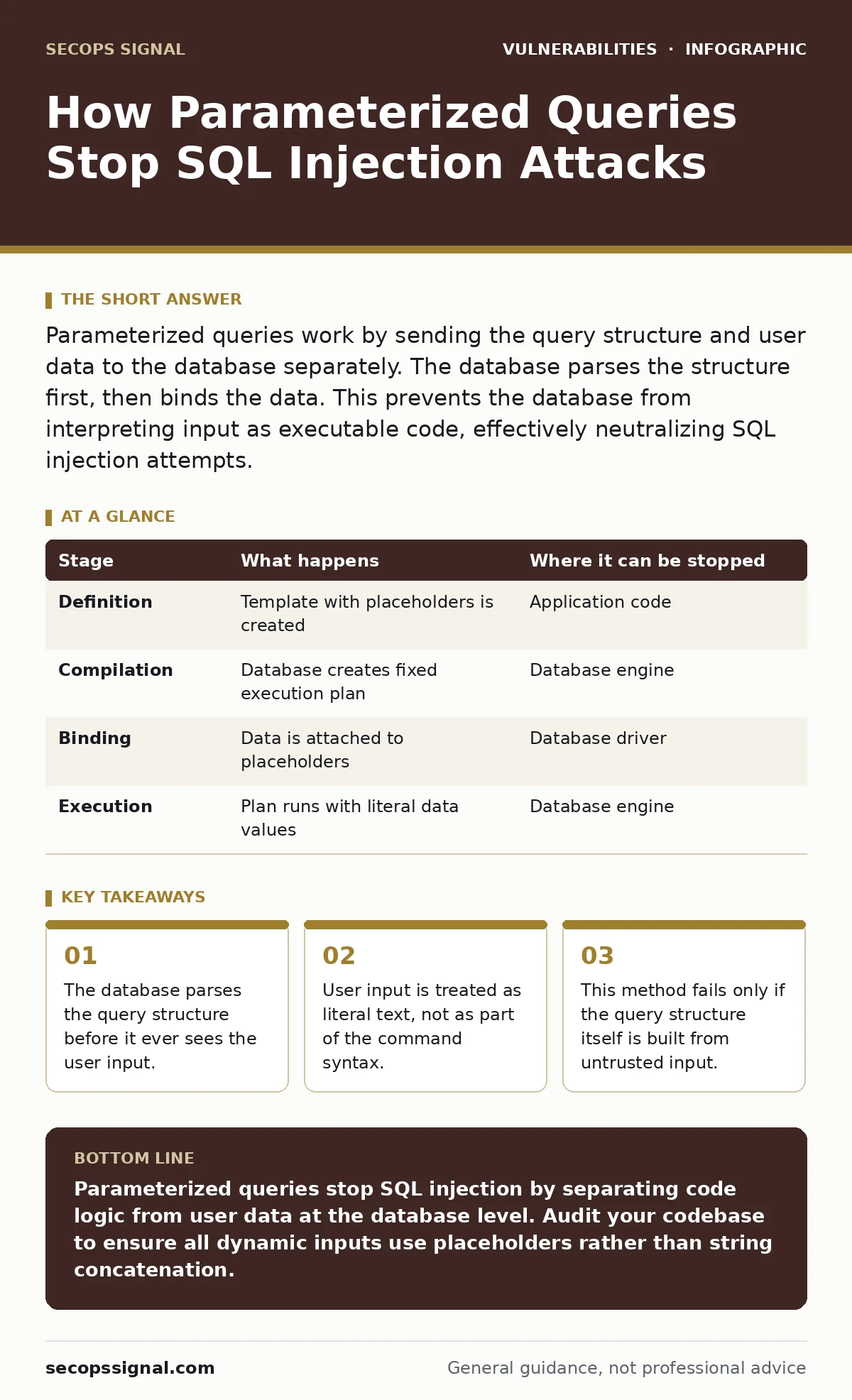
Parameterized queries work by sending the query structure and user data to the database separately. The database parses the structure first, then binds the data. This prevents the database from interpreting input as executable code, effectively neutralizing SQL injection attempts.
The Separation of Concerns
Most developers build database queries by concatenating strings. You take a template, add a variable, and send the result to the server. This approach is fragile because the database cannot distinguish between the instruction and the content. It processes everything as a single string of code.
Parameterized queries change this dynamic. They send the query structure and the data as two distinct packages. The database engine receives the structure first. It compiles a execution plan based on that structure alone. Only after the plan is ready does it accept the data values.
This separation creates a hard boundary. The data cannot alter the logic of the query. Even if the input contains characters that look like SQL commands, the engine ignores their syntactic meaning. It treats them as inert text.
Stage 1: Query Definition
The process begins when your application code defines the request. Instead of building a full string, you write a template with placeholders. These placeholders mark where user input will eventually go. Common placeholders include question marks or named tokens like @name.
The application sends this template to the database driver. The driver prepares the statement. At this point, no user data is attached. The database analyzes the syntax. It checks for errors and determines the most efficient way to execute the logic.
Stage 2: Execution Plan Compilation
Once the template arrives, the database compiler creates an execution plan. This plan is a set of instructions on how to retrieve the data. It defines which indexes to use and which tables to scan. Crucially, this plan is fixed. It does not change based on what the user types.
This step is where traditional string concatenation fails. In a concatenated query, the database compiles the entire string, including the user input. If that input includes a command, the compiler includes that command in the plan. With parameters, the compiler never sees the input. It only sees the placeholder.
The execution plan is cached. If the same template is used again, the database reuses the plan. This improves performance. It also ensures that the logic remains consistent across multiple requests.
Stage 3: Data Binding
After the plan is ready, the application sends the actual data. The database binds this data to the placeholders defined in the template. This is a type-safe operation. The database knows that the placeholder expects a specific data type, such as a string or an integer.
If the input does not match the expected type, the database rejects it. This prevents many forms of injection before they can cause harm. The data is stored in a buffer separate from the code buffer. There is no mixing of contexts.
Imagine a user enters a string that includes a single quote. In a concatenated query, this quote might close the string prematurely. In a parameterized query, the quote is just another character in the buffer. It has no special meaning to the parser.
Stage 4: Execution and Result
The database executes the compiled plan using the bound data. It searches for records that match the literal value provided. If the input was admin' OR '1'='1, the database looks for a user with that exact string as their email. It does not interpret the OR as a logical operator.
The results are returned to the application. The application processes them and sends a response to the user. The entire transaction is isolated from code execution risks. The database never treats the input as a command.
This isolation is the core defense. It removes the ambiguity that attackers exploit. The database knows exactly what is code and what is data. There is no room for interpretation.
Limits of Parameterization
Parameterized queries are not a silver bullet. They only protect against injection in the values you parameterize. If you build the table name or column name from user input, you must use a different method. Placeholders cannot stand in for identifiers.
You must also ensure that the query template itself is static. If you concatenate a variable into the template before sending it, the protection is void. The separation must happen at the driver level, not in your application logic.
Some older databases or drivers may not support prepared statements efficiently. In these cases, you may need to rely on escaping functions. However, escaping is error-prone. Prepared statements are superior because they rely on the database engine, not your code.
Integration with Defense Layers
Parameterized queries work best when combined with other security measures. They do not replace the need for input validation. Validation ensures that the data meets your business rules. It keeps your database clean and predictable.
You should also review your HTTP security headers. These headers control how browsers interact with your site. They can mitigate some risks if an injection does occur. For instance, content security policies can block the execution of injected scripts.
Regular vulnerability scanning helps identify gaps in your implementation. Scanners can test whether your application properly uses prepared statements. They can also find places where you might have missed parameterizing an input.
Consider the risks of session fixation. If an attacker can predict or control session IDs, they can hijack user accounts. While parameterized queries stop SQL injection, they do not protect session tokens. You must secure those separately.
Comparison with Escaping
Many developers believe that escaping special characters is sufficient. Escaping involves adding backslashes or doubling quotes to neutralize their meaning. This approach is fragile. Different databases use different escaping rules.
If you switch databases, your escaping logic may break. Parameterized queries work the same way across all major database systems. The driver handles the conversion. You do not need to know the internal syntax of the database.
Escaping is also prone to human error. You might forget to escape a function or a complex input. Parameterization is structural. It is harder to implement incorrectly. Once you use the API, the protection is automatic.
| Stage | What happens | Where it can be stopped |
|---|---|---|
| Definition | Template with placeholders is created | Application code |
| Compilation | Database creates fixed execution plan | Database engine |
| Binding | Data is attached to placeholders | Database driver |
| Execution | Plan runs with literal data values | Database engine |
Handling Complex Queries
Complex queries with multiple joins or subqueries can be difficult to parameterize. Developers sometimes fall back to concatenation for these cases. This is a dangerous habit. Most database drivers support complex templates.
You may need to use multiple placeholders. Ensure that each user input has its own placeholder. Do not reuse placeholders for different values. This can lead to incorrect data binding.
If you cannot parameterize a specific part of the query, use a whitelist. Allow only predefined values for that part. For example, if a user selects a sorting column, only allow columns from a known list. Never use raw input for identifiers.
Key takeaways
- The database parses the query structure before it ever sees the user input.
- User input is treated as literal text, not as part of the command syntax.
- This method fails only if the query structure itself is built from untrusted input.
Parameterized queries stop SQL injection by separating code logic from user data at the database level. Audit your codebase to ensure all dynamic inputs use placeholders rather than string concatenation.
Frequently asked questions
Can parameterized queries prevent all types of SQL injection?
No, they only prevent injection in the values you parameterize. They do not protect against injection in table names, column names, or SQL keywords if those are built from user input.
Do parameterized queries slow down my application?
They can improve performance by allowing the database to cache execution plans. The overhead of binding parameters is negligible compared to the cost of parsing and optimizing new queries.
Is escaping special characters a valid alternative?
Escaping is less secure and harder to maintain. It relies on correct implementation in your code, whereas parameterization relies on the database engine, which is more reliable.
What if my database driver does not support prepared statements?
You should upgrade your driver or database system. Using unsupported or outdated components increases security risks and reduces performance.
How this guide was produced: written by the SecOps Signal editorial team with AI assistance, checked against the public references listed below, and reviewed when the facts change. See our editorial policy or report an error.