CSPM vs CNAPP: Why You Need Both for Cloud Security
CSPM audits static configurations while CNAPP integrates runtime protection and development workflows to close security gaps before deployment.
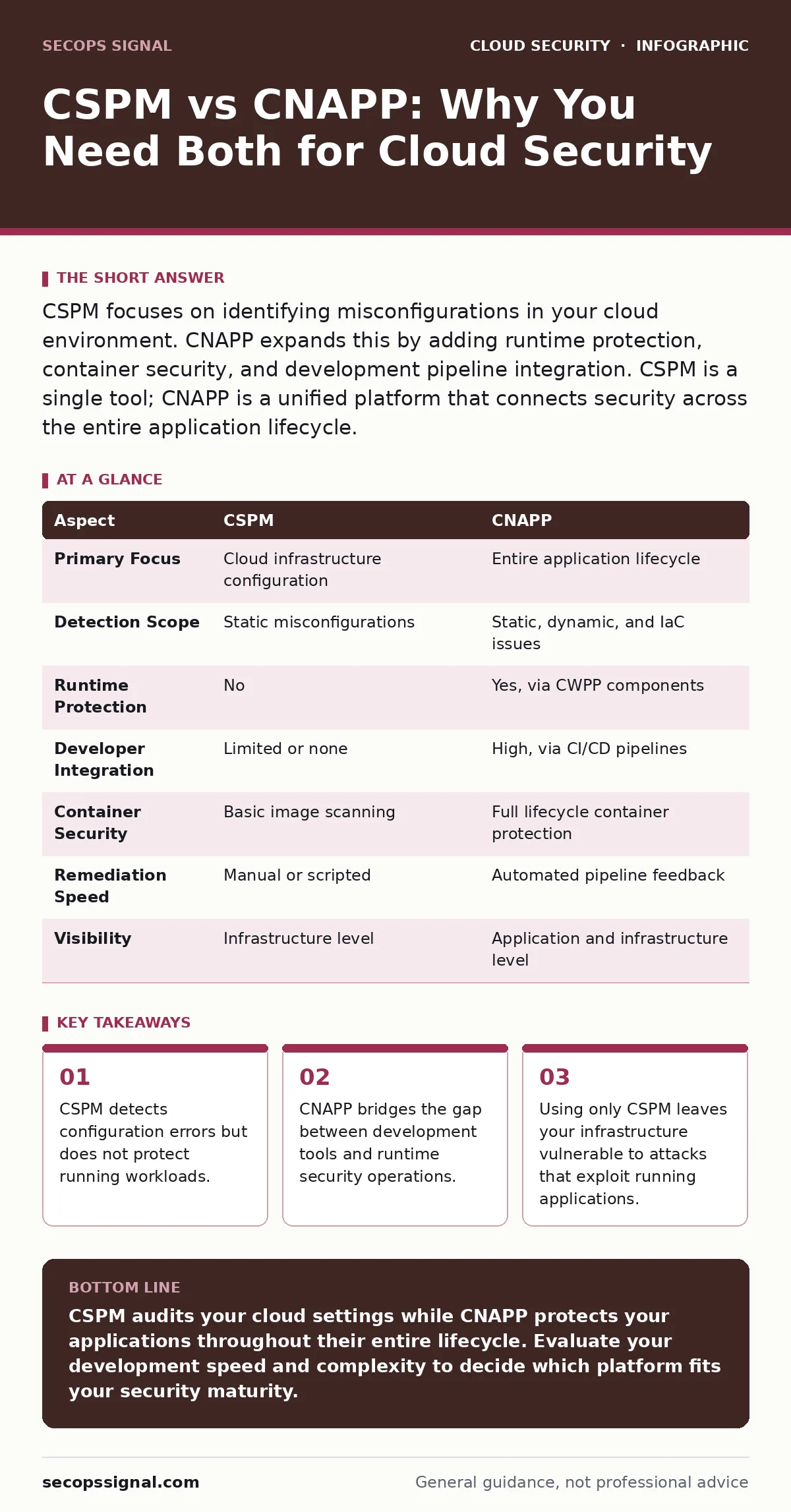
CSPM focuses on identifying misconfigurations in your cloud environment. CNAPP expands this by adding runtime protection, container security, and development pipeline integration. CSPM is a single tool; CNAPP is a unified platform that connects security across the entire application lifecycle.
The Scope of Protection Defines the Difference
Cloud Security Posture Management, or CSPM, acts as a continuous auditor for your cloud infrastructure. It scans your accounts, storage buckets, and network settings against known best practices to find misconfigurations. It tells you if a database is publicly accessible or if logging is disabled. It is a static check of your environment’s security posture.
Cloud-Native Application Protection Platforms, or CNAPP, encompass CSPM but extend protection into the application lifecycle. CNAPP integrates container security, infrastructure-as-code scanning, and runtime protection. It does not just tell you that a configuration is wrong; it helps you fix it in the code and protects the application while it runs. The difference lies in the breadth of the security surface each platform covers.
Comparing CSPM and CNAPP Capabilities
| Aspect | CSPM | CNAPP |
|---|---|---|
| Primary Focus | Cloud infrastructure configuration | Entire application lifecycle |
| Detection Scope | Static misconfigurations | Static, dynamic, and IaC issues |
| Runtime Protection | No | Yes, via CWPP components |
| Developer Integration | Limited or none | High, via CI/CD pipelines |
| Container Security | Basic image scanning | Full lifecycle container protection |
| Remediation Speed | Manual or scripted | Automated pipeline feedback |
| Visibility | Infrastructure level | Application and infrastructure level |
When to Choose CSPM
Select CSPM when your primary concern is compliance and baseline infrastructure hygiene. This approach suits organizations with stable, long-lived infrastructure that changes infrequently. You can manage risk by regularly auditing settings and correcting errors manually. It is effective for ensuring that basic controls, such as encryption at rest, are consistently applied.
Choose this path if your team lacks the resources to integrate security tools into the development pipeline. CSPM provides a clear view of current risks without requiring changes to how developers write code. It is a lower-barrier entry point for organizations beginning their cloud security journey. However, it requires dedicated staff to interpret findings and apply fixes.
When to Choose CNAPP
Choose CNAPP when your applications are built using microservices, containers, or serverless functions. These environments change rapidly, making manual audits ineffective. CNAPP shifts security left by catching misconfigured IAM roles or secrets in source code before the code ever reaches production. It reduces the time between finding a flaw and fixing it.
This platform is necessary when you need visibility into how applications behave while they are running. It detects anomalous activity, such as unexpected network connections or privilege escalation attempts. CNAPP unifies disparate security tools into a single pane of glass, reducing alert fatigue for security teams. It is ideal for organizations that prioritize speed and automation in their deployment processes.
Understanding the Overlap
CNAPP includes CSPM as one of its core components. You cannot have a CNAPP without the ability to scan for cloud misconfigurations. The overlap exists because infrastructure security is a prerequisite for application security. However, CNAPP adds layers of protection that CSPM lacks. It connects the configuration data with runtime behavior and development context.
This integration allows for smarter remediation. Instead of just flagging an open port, CNAPP can trace the issue back to the specific line of infrastructure-as-code that created it. It can also check if the application running on that port is actually being exploited. This contextual awareness is what separates a simple audit tool from a comprehensive protection platform.
See also: Shadow IT Definition: How to Find Hidden Cloud Risks · Cloud Security Examples: How Security Groups Enforce Zero Trust
The Hidden Cost of Fragmented Tools
Many organizations start with CSPM and later add separate tools for container security or runtime protection. This creates a fragmented security landscape. You end up with multiple dashboards, duplicate alerts, and no single source of truth. Security teams waste time correlating data from different sources instead of responding to threats.
CNAPP solves this by unifying these capabilities. It reduces the operational overhead of managing multiple vendors. However, adopting a CNAPP requires a cultural shift. Developers must accept security feedback in their daily workflows. If the platform generates too many false positives, developers will ignore it. Balancing security rigor with developer experience is the key to success.
Bridging the Gap in Your Strategy
You do not have to choose between CSPM and CNAPP as mutually exclusive options. If you already have CSPM, you can gradually adopt CNAPP capabilities. Start by integrating container security and runtime protection. Then, move toward shifting security checks earlier in the development pipeline. This phased approach allows you to build maturity without disrupting operations.
Consider how cloud network segmentation interacts with your security tools. CNAPP can help enforce segmentation policies by monitoring traffic patterns. CSPM can verify that security groups are correctly configured. Using both perspectives ensures that your network is secure at both the configuration and behavioral levels. This layered defense makes it harder for attackers to move laterally.
Final Considerations for Implementation
Before selecting a tool, assess your current development practices. If your teams use just-in-time access for administrative tasks, ensure your security platform supports this model. CNAPP solutions are better equipped to handle dynamic access patterns than traditional CSPM tools. They can correlate access events with runtime behavior to detect unauthorized actions.
Remember that no tool provides complete protection. Both CSPM and CNAMP require human oversight and proper configuration. The goal is to reduce risk to an acceptable level while maintaining operational efficiency. Start with a clear understanding of your most critical assets and the threats they face. Let that understanding drive your tool selection and implementation strategy.
Key takeaways
- CSPM detects configuration errors but does not protect running workloads.
- CNAPP bridges the gap between development tools and runtime security operations.
- Using only CSPM leaves your infrastructure vulnerable to attacks that exploit running applications.
CSPM audits your cloud settings while CNAPP protects your applications throughout their entire lifecycle. Evaluate your development speed and complexity to decide which platform fits your security maturity.
Frequently asked questions
Can CSPM replace CNAPP for small teams?
CSPM can provide basic visibility for small teams with static infrastructure, but it lacks the runtime protection and developer integration that CNAPP offers for modern applications.
Is CNAPP only for large enterprises?
No, CNAPP is beneficial for any organization using cloud-native technologies like containers or serverless functions, regardless of size, as it automates security tasks.
How does CNAPP handle infrastructure-as-code misconfigurations?
CNAPP scans infrastructure-as-code files during the development phase, identifying errors before deployment, which prevents misconfigurations from reaching the live environment.
Does CNAPP protect against data breaches?
CNAPP helps prevent breaches by identifying vulnerabilities and misconfigurations, but it is part of a broader security strategy that includes data encryption and access controls.
How this guide was produced: written by the SecOps Signal editorial team with AI assistance, checked against the public references listed below, and reviewed when the facts change. See our editorial policy or report an error.