Endpoint Telemetry Explained: The Hidden Signals That Reveal Threats
Most endpoint telemetry fails because it captures too much noise, masking the few signals that actually indicate an active intrusion attempt.

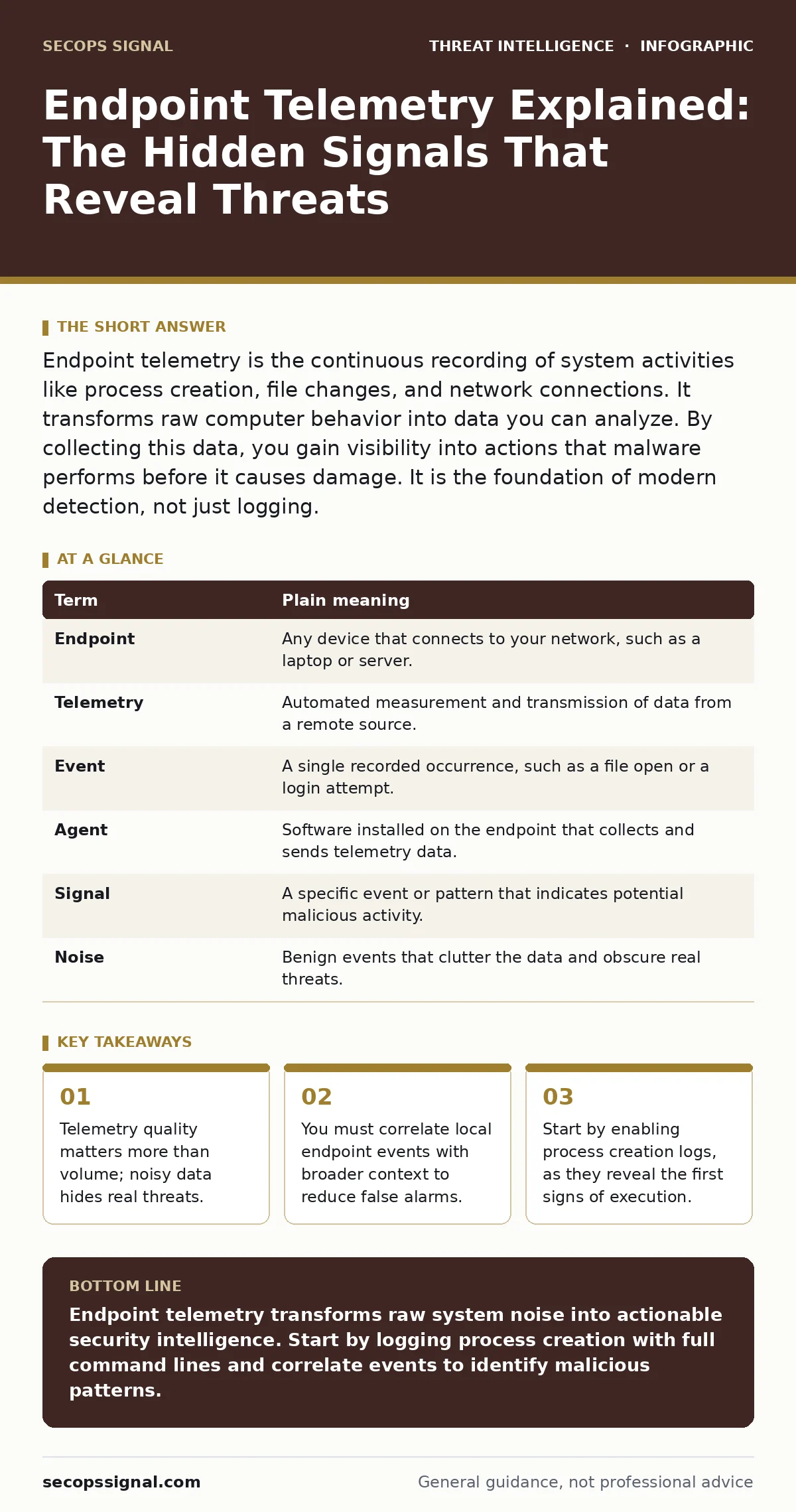
Endpoint telemetry is the continuous recording of system activities like process creation, file changes, and network connections. It transforms raw computer behavior into data you can analyze. By collecting this data, you gain visibility into actions that malware performs before it causes damage. It is the foundation of modern detection, not just logging.
The Library of Human Behavior
Imagine a busy public library. The security cameras record every person who walks through the doors. This is raw video footage. It is vast, unstructured, and difficult to search. Now imagine the librarian keeps a ledger. The ledger records who checked out which book, at what time, and whether they returned it late. This ledger is telemetry. It is structured data that tells a story about behavior, not just presence.
In cybersecurity, your computers are the library. The operating system generates millions of events every day. Most of these events are benign background noise, like the hum of the HVAC system. Telemetry filters this noise. It captures specific actions that indicate intent. You are not watching the camera feed. You are reading the checkout ledger to find patterns that do not belong.
Defining the Data Stream
To understand what you are collecting, you must define the components. Telemetry is not a single file. It is a stream of structured records. Each record describes a discrete event. These events fall into categories. Process execution logs show what programs start. File system logs show what files change. Network logs show where data travels.
The value lies in the structure. Raw logs are text blobs. Telemetry is normalized. It uses standard fields like timestamp, source IP, and user ID. This normalization allows you to compare data across different machines. You can ask, "Did this user run this script on three different computers in one minute?" Without structured telemetry, this question is unanswerable.
| Term | Plain meaning |
|---|---|
| Endpoint | Any device that connects to your network, such as a laptop or server. |
| Telemetry | Automated measurement and transmission of data from a remote source. |
| Event | A single recorded occurrence, such as a file open or a login attempt. |
| Agent | Software installed on the endpoint that collects and sends telemetry data. |
| Signal | A specific event or pattern that indicates potential malicious activity. |
| Noise | Benign events that clutter the data and obscure real threats. |
The Cost of Blind Spots
Many organizations assume that more data equals better security. This is a dangerous misconception. Collecting every possible event creates storage costs and analysis paralysis. Security teams drown in alerts. They miss the needle because the haystack is infinite. The hidden cost of excessive telemetry is alert fatigue. Analysts become numb to warnings. They stop investigating.
You must choose what to record based on risk. Not all actions are equal. A user opening a web browser is low risk. A user running a command-line tool to modify system files is high risk. Focus on high-fidelity signals. These are events that rarely happen in normal operations but are common in attacks. This approach aligns with the intelligence cycle, where you define requirements before collection. You do not collect everything. You collect what helps you answer specific questions about threat behavior.
Correlation Is The Key
An endpoint event in isolation is often meaningless. A process named "svchost.exe" running is normal. The same process running from the Temp directory is suspicious. Context provides the context. You need to know where the file came from, who triggered it, and what it did next.
This is where tools like SIEM (Security Information and Event Management) become relevant. A SIEM aggregates telemetry from many endpoints. It correlates events over time. It connects a login on one machine to a file access on another. Without correlation, you see disjointed fragments. With correlation, you see a narrative. You see the attacker moving laterally. You see the data exfiltration.
Practical Implementation Steps
You do not need a massive infrastructure to start. You need a clear plan. Begin with the most common attack vector: execution. Malware must run to do harm. If you capture every process start, you capture the beginning of most attacks.
- Enable process creation logging on your critical servers. This records the full command line, not just the program name. The command line reveals arguments that indicate abuse.
- Configure your agent to send these logs to a central location. Do not leave them on the local machine. Attackers can delete local logs. Centralized storage preserves evidence.
- Create a baseline of normal activity. Note which users typically run which programs. Flag deviations from this baseline. A database admin running a text editor is unusual. A text editor running a script is critical.
See also: Preventing Data Exposure Seen By Dark Web Monitoring · How Tactical Threat Intelligence Works: From Data to Defense
Refining Your Detection
Once you have data, you need rules to interpret it. Writing custom rules is time-consuming. You can use open standards like Sigma rules. These are generic detection rules that you can convert to your specific platform. They provide a starting point for common threats.
However, generic rules generate false positives. You must tune them. If a rule alerts every time a user installs software, it is useless. Adjust the threshold. Require additional conditions, such as the software being unsigned or running from a temp folder. This refinement reduces noise. It increases the signal-to-noise ratio.
Beyond Basic Logging
Advanced threats use techniques that bypass simple logging. They may use PowerShell abuse to execute code in memory. They may use remote desktop abuse to move between machines. Your telemetry must capture these behaviors. This requires deeper visibility. You may need to integrate with SOAR (Security Orchestration, Automation and Response) to automate the initial triage.
Consider using honeytokens. These are fake credentials or files placed in your environment. They serve no legitimate purpose. If telemetry shows a honeytoken being accessed, you know it is an attacker. This is a high-fidelity signal. It requires no tuning. It is a tripwire.
Key takeaways
- Telemetry quality matters more than volume; noisy data hides real threats.
- You must correlate local endpoint events with broader context to reduce false alarms.
- Start by enabling process creation logs, as they reveal the first signs of execution.
Endpoint telemetry transforms raw system noise into actionable security intelligence. Start by logging process creation with full command lines and correlate events to identify malicious patterns.
Frequently asked questions
How much telemetry data is too much?
There is no fixed limit. Focus on high-fidelity events that indicate malicious intent. If your analysis team cannot review alerts within hours, you have too much data.
Do I need a SIEM to use endpoint telemetry?
No. You can start with simple log aggregation. However, a SIEM provides the correlation engine needed to connect events across multiple endpoints and timeframes.
Can attackers hide from endpoint telemetry?
Yes. Sophisticated attackers can disable agents or use fileless techniques. This is why you need multiple data sources and behavioral analysis, not just static signatures.
How do I validate my telemetry collection?
Perform regular tests. Run benign scripts that mimic attack behaviors. Verify that your system captures the events and generates the expected alerts.
How this guide was produced: written by the SecOps Signal editorial team with AI assistance, checked against the public references listed below, and reviewed when the facts change. See our editorial policy or report an error.