PowerShell Abuse Explained: How Attackers Use Admin Tools
Attackers use PowerShell not to install malware, but to hide their actions inside the operating system's own administrative language.

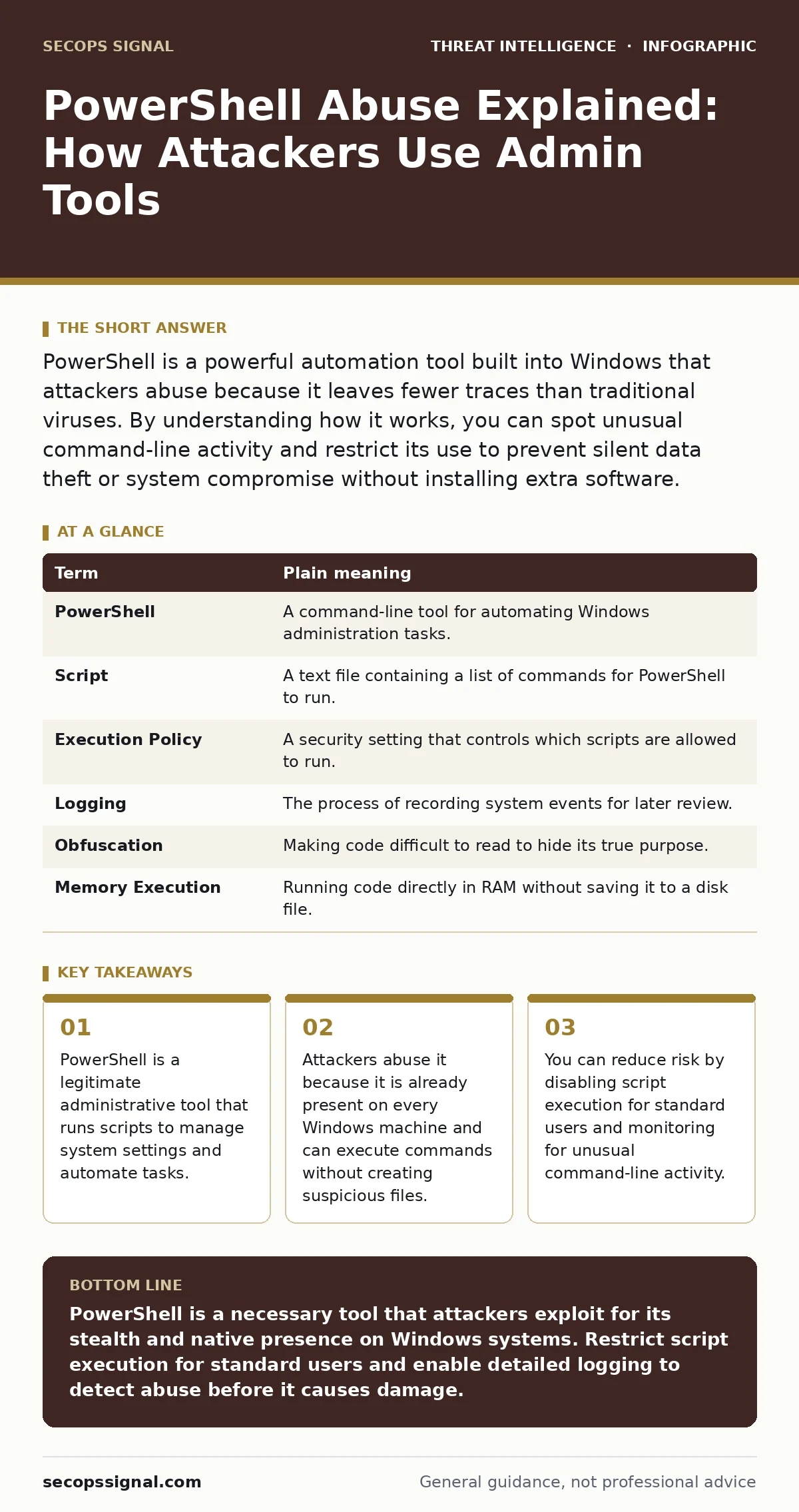
PowerShell is a powerful automation tool built into Windows that attackers abuse because it leaves fewer traces than traditional viruses. By understanding how it works, you can spot unusual command-line activity and restrict its use to prevent silent data theft or system compromise without installing extra software.
The Swiss Army Knife Analogy
Imagine your computer is a house. Most tools, like web browsers or word processors, are like guests. They stay in specific rooms and follow house rules. PowerShell is different. It is like a master key held by the homeowner. It can open any door, change the locks, or rearrange furniture. This power makes it incredibly useful for system administrators who need to manage many computers at once.
However, this same accessibility creates a blind spot. If a burglar steals the master key, they do not need to break a window. They walk in through the front door, looking exactly like the homeowner. To an observer, their movements appear normal. This is why PowerShell abuse is so dangerous. It allows attackers to operate within the trusted boundaries of the operating system.
Why Attackers Prefer Native Tools
Attackers often avoid downloading large, suspicious files because security software scans for those easily. Instead, they look for tools already installed on your system. PowerShell is one of these tools. It is a command-line shell and scripting language developed by Microsoft. It allows users to issue commands to the computer rather than clicking icons.
Because PowerShell is a native component, its traffic does not look like malware. It looks like routine system management. This technique is part of a broader strategy known in the MITRE ATT&CK framework as "Living off the Land." Attackers use legitimate administrative tools to perform malicious actions. They might use PowerShell to download a small piece of code, run it in memory, and then delete the evidence.
| Term | Plain meaning |
|---|---|
| PowerShell | A command-line tool for automating Windows administration tasks. |
| Script | A text file containing a list of commands for PowerShell to run. |
| Execution Policy | A security setting that controls which scripts are allowed to run. |
| Logging | The process of recording system events for later review. |
| Obfuscation | Making code difficult to read to hide its true purpose. |
| Memory Execution | Running code directly in RAM without saving it to a disk file. |
The Hidden Cost of Convenience
The primary advantage for an attacker is stealth. When you run a traditional virus, it creates a file on your hard drive. Antivirus programs scan these files. When an attacker uses PowerShell, they can run commands that never touch the disk. The code lives only in the computer's memory. This makes it much harder for standard security tools to detect.
This approach also bypasses simple file-based alerts. If you rely solely on signature-based detection, you are looking for known bad files. PowerShell abuse often involves custom commands that do not match any known signature. This is why monitoring behavior is more effective than scanning files. You must look at what the tool is doing, not just what it is.
What This Means for You
If you are a standard user, you likely never open PowerShell. That is good. Most daily tasks do not require it. However, if you run a small business, your employees might use scripts to automate reports or manage software. This convenience introduces risk. A malicious script could be disguised as a helpful utility.
Suppose an employee receives an email with a spreadsheet. The spreadsheet contains a macro that triggers a PowerShell command. The command contacts a remote server and downloads additional instructions. This is a common initial access vector. It often starts with phishing infrastructure that looks legitimate. The attack succeeds not because of a software flaw, but because the tool was allowed to run without restriction.
Simple Safety Habits
You cannot remove PowerShell from Windows without breaking many system functions. Instead, you must control how it is used. The first step is to restrict who can run scripts. By default, many systems allow any user to execute scripts. This is unnecessary for most people. You should change the Execution Policy to "Restricted" or "AllSigned" for standard user accounts. This prevents unauthorized scripts from running automatically.
The second step is to ensure logging is enabled. PowerShell can record every command it executes. If you do not enable this, you are flying blind. When an incident occurs, you will not know what happened. Enabling module logging and script block logging provides a record of activity. This data is critical for forensic analysis.
See also: USB Device Control: How Operating Systems Block Physical Threats · Dark web threat intelligence: what it is and how to use it
Monitoring for Anomalies
You need a way to review the logs you collect. For small teams, this might mean checking event logs manually. For larger operations, you might use a SIEM (Security Information and Event Management) system. These tools aggregate logs from many sources and highlight suspicious patterns.
Look for commands that involve downloading data, such as Invoke-WebRequest or DownloadString. These are common in attacks. Also watch for commands that interact with the registry or create new processes. While these actions are legitimate for admins, they are rare for standard users. If you see them, investigate immediately.
Try This Now
- Open PowerShell as an administrator and type
Get-ExecutionPolicy. If it returns "Unrestricted" or "RemoteSigned," consider changing it to "Restricted" for non-admin users. - Enable PowerShell script block logging via the registry or Group Policy. This records the actual code being run, not just the command line.
- Review your event logs for Event ID 4104. This ID indicates PowerShell activity. Look for scripts running from unexpected directories like %TEMP% or user profile folders.
Key takeaways
- PowerShell is a legitimate administrative tool that runs scripts to manage system settings and automate tasks.
- Attackers abuse it because it is already present on every Windows machine and can execute commands without creating suspicious files.
- You can reduce risk by disabling script execution for standard users and monitoring for unusual command-line activity.
PowerShell is a necessary tool that attackers exploit for its stealth and native presence on Windows systems. Restrict script execution for standard users and enable detailed logging to detect abuse before it causes damage.
Frequently asked questions
Can I uninstall PowerShell to stop abuse?
No, PowerShell is deeply integrated into Windows. Removing it will break many system functions and applications that rely on it for management tasks.
Does antivirus software detect PowerShell abuse?
Traditional antivirus often misses it because no malicious file is downloaded. You need behavior-based detection or endpoint detection and response tools to spot suspicious commands.
Is PowerShell only for Windows?
Originally yes, but it is now cross-platform. However, abuse is most common on Windows because it is the default administrative shell for most corporate environments.
How do I know if a script is safe?
You generally should not run scripts from untrusted sources. If you must, verify the digital signature of the script and review the code for commands that download or execute other files.
How this guide was produced: written by the SecOps Signal editorial team with AI assistance, checked against the public references listed below, and reviewed when the facts change. See our editorial policy or report an error.