Detect DLL Hijacking: Evidence in Logs, Systems and Behavior
Attackers exploit standard Windows search order behaviors to inject code, leaving traces in file timestamps and process ancestry that standard scanners often miss.
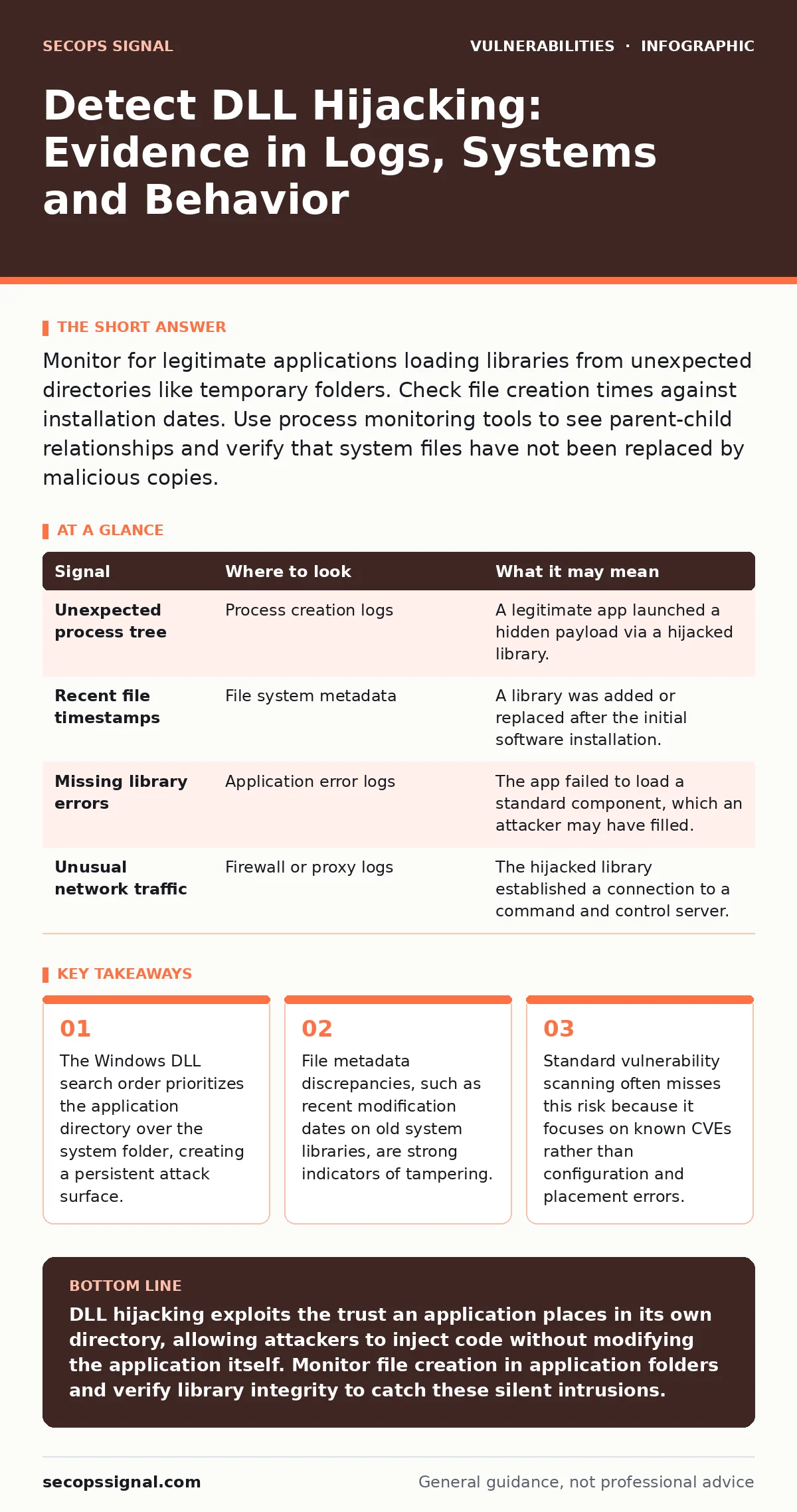
Monitor for legitimate applications loading libraries from unexpected directories like temporary folders. Check file creation times against installation dates. Use process monitoring tools to see parent-child relationships and verify that system files have not been replaced by malicious copies.
The Search Order Mechanism
Windows does not load dynamic link libraries from a single fixed location. Instead, it follows a specific search order when an application requests a library. The system first checks the directory containing the executable. This behavior is intentional for software compatibility but creates a significant security gap. If a legitimate application is missing a specific library, an attacker can place a malicious file with that name in the same folder. The application loads the malicious code instead of the intended system component.
This technique relies on the application’s trust in its own directory. The operating system does not verify whether the library belongs to the vendor or was placed there by an intruder. This means that even fully patched software can be compromised if the installation is incomplete or if the attacker has write access to the application folder.
Process and File Anomalies
The first sign of a successful hijack often appears in process behavior. A legitimate application may spawn unexpected child processes or communicate with remote addresses it never contacted before. You can detect this by monitoring process creation events. Look for legitimate binaries launching commands that do not match their normal function. For example, a word processor spawning a command prompt or a network utility is a clear deviation.
File metadata provides another layer of evidence. System libraries should have stable creation and modification dates that align with the software installation or update history. If you see a library in the application directory with a recent timestamp, it suggests someone added it recently. Compare the file size and hash against known good values. A mismatch indicates the file is not the original vendor distribution.
Log Signals and Indicators
System logs capture the moment the operating system resolves the library path. In Windows Event Logs, you can find audit events for file creation and process execution. Look for events where a known application creates or modifies a file with a .dll extension in its own directory. These events often precede the actual execution of the malicious code.
| Signal | Where to look | What it may mean |
|---|---|---|
| Unexpected process tree | Process creation logs | A legitimate app launched a hidden payload via a hijacked library. |
| Recent file timestamps | File system metadata | A library was added or replaced after the initial software installation. |
| Missing library errors | Application error logs | The app failed to load a standard component, which an attacker may have filled. |
| Unusual network traffic | Firewall or proxy logs | The hijacked library established a connection to a command and control server. |
Tooling for Detection
Standard antivirus solutions often struggle with this technique because the malicious code may not match known signatures. You need tools that focus on behavior and integrity. Endpoint detection and response platforms can monitor for the specific sequence of events: a library load followed by unexpected network activity. File integrity monitoring tools are particularly effective. They alert you when any file in critical directories changes, including new additions.
Network security tools can also help by identifying outbound connections from processes that should not have network access. If a local utility suddenly sends data to an external IP, it may be using a hijacked library to exfiltrate information.
Common Blind Spots
Many teams focus exclusively on the system32 directory, assuming that is the only place libraries are loaded. This is a critical error. The application directory is the highest priority in the search order for many modern applications. Attackers know this and target these directories specifically. Another blind spot is ignoring temporary directories. Some applications search the current working directory, which can be a temporary folder. If an attacker controls the temp folder, they can influence library loading.
Another oversight is failing to check for missing dependencies. If an application logs errors about missing libraries, it is vulnerable to hijacking. An attacker can simply provide the missing file. Regularly reviewing application logs for missing component errors helps identify these gaps before they are exploited.
Mitigation and Verification
Preventing this attack requires changing how the system resolves libraries. Application developers can use manifest files to explicitly declare which libraries are required. This forces the system to load only the specified versions, ignoring files in the application directory. For existing software, you can use system policies to disable the search in the current directory. This setting reduces the attack surface but may break older applications that rely on this behavior.
Regularly verify the integrity of your software installations. Use check sums to ensure that all libraries match the vendor’s original distribution. If you find discrepancies, investigate immediately. Remove any unauthorized files and restore the original libraries from a clean backup. This process is part of a broader strategy for risk-based vulnerability management, where you prioritize fixes based on the actual exposure of your systems.
The Role of Updates
Keeping software updated is necessary but not sufficient. A patch may fix a code vulnerability but leave the search order behavior unchanged. You must also ensure that the installation is complete. Missing files create the opportunity for hijacking. When deploying updates, verify that all components are present and correctly placed. This diligence complements your efforts in vulnerability prioritization, ensuring that you address both code flaws and configuration risks.
By combining process monitoring, file integrity checks, and careful configuration, you can detect and prevent these attacks. The key is to look beyond the code and examine the environment in which the code runs. This approach reveals the subtle traces that attackers leave behind.
Key takeaways
- The Windows DLL search order prioritizes the application directory over the system folder, creating a persistent attack surface.
- File metadata discrepancies, such as recent modification dates on old system libraries, are strong indicators of tampering.
- Standard vulnerability scanning often misses this risk because it focuses on known CVEs rather than configuration and placement errors.
DLL hijacking exploits the trust an application places in its own directory, allowing attackers to inject code without modifying the application itself. Monitor file creation in application folders and verify library integrity to catch these silent intrusions.
Frequently asked questions
Does Windows Defender protect against DLL hijacking?
It may detect known malicious libraries, but it often misses custom or obfuscated payloads that do not match existing signatures. Behavioral monitoring is more effective.
How do I know if a DLL is legitimate?
Compare the file hash with the vendor’s published values. Check the digital signature and verify that the file timestamp matches the installation date.
Can this happen on Linux systems?
Linux uses a similar mechanism with shared libraries, but the search paths and permissions model are different. The risk exists but manifests differently.
Should I block all DLL creation in application folders?
Blocking all creation may break legitimate software updates. Instead, monitor for creation and alert on any new DLL files in read-only directories.
How this guide was produced: written by the SecOps Signal editorial team with AI assistance, checked against the public references listed below, and reviewed when the facts change. See our editorial policy or report an error.