USB Device Control: How Operating Systems Block Physical Threats
Operating systems enforce USB control by intercepting hardware interrupts before the kernel loads drivers, stopping threats at the electrical signal level rather than the file level.
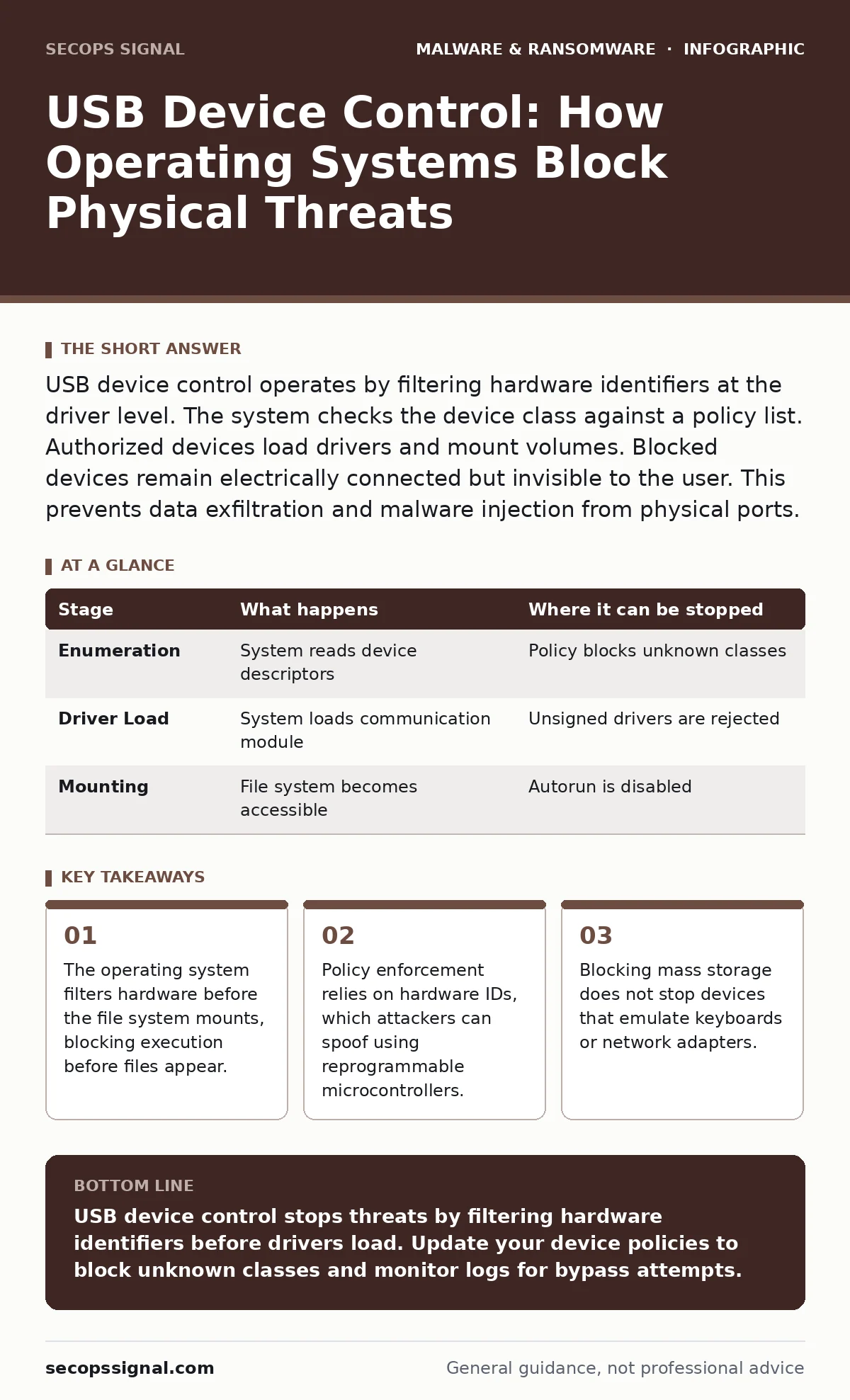
USB device control operates by filtering hardware identifiers at the driver level. The system checks the device class against a policy list. Authorized devices load drivers and mount volumes. Blocked devices remain electrically connected but invisible to the user. This prevents data exfiltration and malware injection from physical ports.
The Hardware Handshake
When you insert a USB plug, the operating system does not immediately trust the device. The host controller detects a change in voltage on the data lines. This electrical shift triggers an interrupt. The system queries the device for its descriptors. These descriptors contain the vendor ID, product ID, and class code. The class code tells the system if the device is a keyboard, a mass storage drive, or a network adapter. The system uses these identifiers to decide whether to load a driver. This decision happens before any files are accessible.
The handshake establishes the basic capabilities of the peripheral. If the device claims to be a simple mouse, the system loads a generic input driver. If it claims to be a hard drive, the system prepares to mount a file system. This initial exchange is the first line of defense. A device must correctly identify itself to proceed. Incorrect or missing descriptors cause the connection to fail silently. The user sees no error message, but the device remains inactive.
Stage 1: Policy Evaluation
The operating system maintains a list of allowed and blocked device classes. This policy is often stored in a central configuration database. When the system receives the device descriptors, it compares them against this list. If the policy blocks mass storage devices, the system stops the enumeration process. The device remains powered, but the operating system refuses to load the mass storage driver. This prevents the user from accessing the file system. It also prevents any executable files on the device from running automatically.
This stage relies on the accuracy of the device identifiers. The system trusts the information provided by the hardware. If a device lies about its class, the policy may not trigger. A malicious device can claim to be a printer while acting as a storage drive. The policy evaluation checks the stated class, not the actual behavior. This limitation allows sophisticated threats to bypass simple class-based filtering. The system assumes the hardware is honest during this phase.
Stage 2: Driver Loading
If the device passes the policy check, the system loads the appropriate driver. A driver is a software module that allows the operating system to communicate with the hardware. The driver translates generic commands into specific signals the device understands. For a USB drive, the storage driver handles read and write requests. For a keyboard, the input driver translates key presses into characters. The driver runs with high privileges. A compromised driver can bypass many security controls.
The system verifies the digital signature of the driver before loading it. This signature proves the driver comes from a trusted source. Unsigned drivers are often blocked by default. This prevents malicious code from injecting itself into the hardware communication path. However, if a legitimate driver contains a vulnerability, an attacker can exploit it. The driver becomes a bridge for malware to enter the system. The security of the device control depends on the integrity of these drivers.
Stage 3: Volume Mounting
Once the driver is active, the system attempts to mount the volume. Mounting makes the file system accessible to applications and users. The system reads the partition table and file system metadata. It checks for file system errors and repairs minor issues. Only after successful mounting does the user see the drive in the file explorer. This step introduces the risk of autorun attacks. Some systems automatically execute scripts when a volume mounts. Modern operating systems disable this behavior by default.
The mounting process exposes the contents of the device to the host. If the device contains malware, the malware is now present on the system. The user must interact with the files for execution to occur. Simply having the files available does not run them. The operating system relies on application whitelisting and user behavior to prevent execution. The device control mechanism stops here. It prevents the device from appearing, but it does not scan the files. File scanning is a separate security function.
| Stage | What happens | Where it can be stopped |
|---|---|---|
| Enumeration | System reads device descriptors | Policy blocks unknown classes |
| Driver Load | System loads communication module | Unsigned drivers are rejected |
| Mounting | File system becomes accessible | Autorun is disabled |
Limits of Device Class Filtering
Device control relies on the assumption that hardware identifiers are static. This assumption is false for many modern devices. Attackers use reprogrammable microcontrollers to create devices that change their identity. These devices can start as a trusted class and switch to a malicious one. The operating system may have already loaded the initial driver. The subsequent behavior changes are not checked against the original policy. This technique is known as device spoofing.
Imagine a security key that also contains a storage chip. The system trusts the security key and loads its driver. The attacker then triggers the storage chip to enumerate as a mass storage device. The system may allow this because the physical connector is trusted. The policy did not account for multi-function devices. This edge case highlights the fragility of identifier-based security. The system trusts the hardware because it was previously authorized, not because it is safe.
The Human Factor in Control
Technical controls fail when users bypass them. Users can disable USB security software to connect a legitimate device. They may install unofficial drivers to make a device work. This creates a gap in the security perimeter. The operating system allows local administrators to override policies. This flexibility is necessary for business operations but dangerous for security. A user with admin rights can disable device control entirely.
Physical access to a computer is a significant threat. An attacker with physical access can remove the hard drive and connect it to another machine. They can boot the computer from a USB drive. Device control policies often do not apply to the boot process. The firmware may allow booting from USB regardless of the operating system settings. This bypasses all software-based controls. The attacker gains full control of the system before the operating system even starts. See the guide on bootkits for details on firmware-level threats.
Integrating with Broader Security
USB device control is one layer of defense. It must work with other security measures to be effective. File scanning checks the contents of mounted drives. Behavior-based detection monitors for suspicious actions by loaded drivers. If a driver attempts to access sensitive data, the detection system can block it. This adds a second check after the device is allowed. The combination of prevention and detection reduces the risk of successful attacks.
Remote access tools can also be used to deploy device control policies. Administrators can update the allowed device list from a central server. This ensures all computers follow the same rules. It also allows rapid response to new threats. If a new type of malicious device is discovered, the policy can be updated globally. This centralization improves consistency and reduces configuration errors. See the guide on remote access tool abuse for risks associated with centralized management.
Monitoring and Logging
Effective device control requires logging. The system must record every connection attempt. This includes successful connections and blocked attempts. Logs provide evidence of policy violations. They help administrators identify trends and adjust policies. If many users are trying to connect blocked devices, the policy may be too restrictive. If blocked attempts come from unusual times, it may indicate an attack.
Logs must be stored securely. Attackers often delete logs to cover their tracks. Sending logs to a remote server prevents tampering. This ensures the history of device connections is preserved. Forensic analysis can use these logs to reconstruct an attack. See the guide on memory forensics for techniques to analyze active processes during an investigation. Logging is not a control itself. It is a tool for understanding and improving controls.
Key takeaways
- The operating system filters hardware before the file system mounts, blocking execution before files appear.
- Policy enforcement relies on hardware IDs, which attackers can spoof using reprogrammable microcontrollers.
- Blocking mass storage does not stop devices that emulate keyboards or network adapters.
USB device control stops threats by filtering hardware identifiers before drivers load. Update your device policies to block unknown classes and monitor logs for bypass attempts.
Frequently asked questions
Does USB device control stop all malware?
No. It blocks devices that rely on mass storage drivers. It does not stop devices that emulate keyboards, network adapters, or other trusted classes. Attackers can bypass controls by spoofing device identifiers.
Can I allow specific USB drives?
Yes. Most systems allow you to whitelist specific vendor and product IDs. This lets you authorize trusted devices while blocking others. You must know the exact IDs of the devices you want to allow.
How do I prevent booting from USB?
Device control policies often do not affect the firmware. You must disable USB boot in the BIOS or UEFI settings. This prevents attackers from loading an operating system from a USB drive. Firmware passwords add another layer of protection.
What happens if a device is unplugged?
The system unmounts the volume and stops the driver. Any open files are closed. Data being written may be lost if the disconnect is sudden. The system logs the disconnection event. This helps track usage patterns and potential data loss incidents.
How this guide was produced: written by the SecOps Signal editorial team with AI assistance, checked against the public references listed below, and reviewed when the facts change. See our editorial policy or report an error.