Common Digital Forensics Mistakes That Destroy Evidence
Most incident response failures occur because responders alter the very data they need to prove what happened, turning a recoverable incident into an unrecoverable liability.
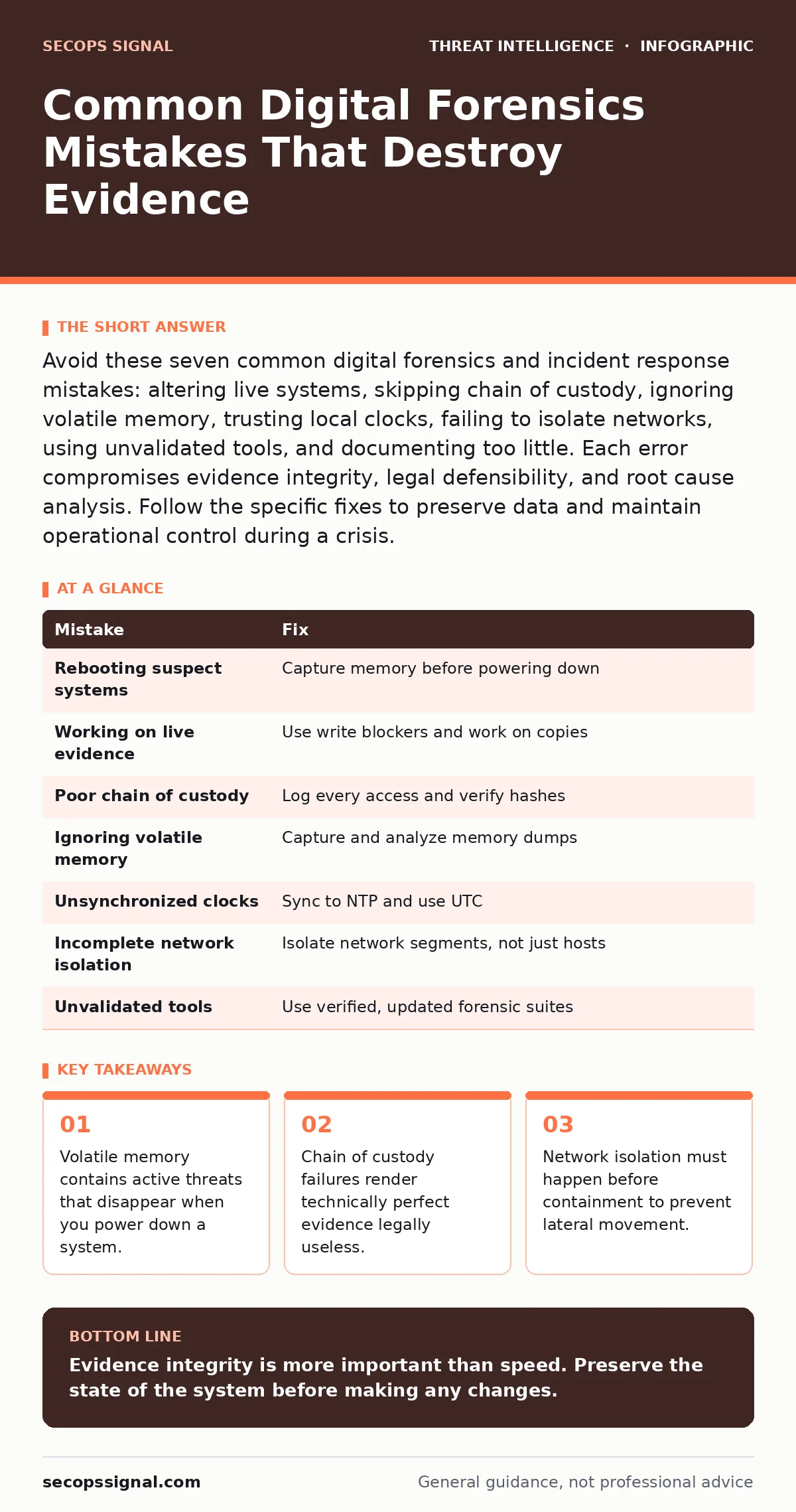
Avoid these seven common digital forensics and incident response mistakes: altering live systems, skipping chain of custody, ignoring volatile memory, trusting local clocks, failing to isolate networks, using unvalidated tools, and documenting too little. Each error compromises evidence integrity, legal defensibility, and root cause analysis. Follow the specific fixes to preserve data and maintain operational control during a crisis.
Mistake 1: Rebooting or powering down the suspect system immediately
Why it hurts:
You treat the infected machine like a broken appliance that needs a restart. This action destroys volatile data. Volatile data exists only in random access memory while the system is running. It contains active network connections, running processes, and decrypted encryption keys. Once the power cuts, that evidence vanishes. You lose the ability to see what the malware was doing in real time.
The fix:
Leave the system running if possible. If you must shut it down, document the reason clearly. For remote systems, you may need to use remote tools to capture memory before termination. This preserves the state of the attack for later analysis. It allows you to identify active connections and hidden processes that disk images cannot show.
Mistake 2: Working directly on the live evidence without imaging
Why it hurts:
You plug the suspect hard drive into your own workstation to look for files. Every time you access a drive, the operating system writes new data. This includes metadata updates, access logs, and temporary files. You alter the original evidence. This contamination makes it impossible to prove the data remained unchanged since the incident. Legal teams will reject this evidence.
The fix:
Create a bit-for-bit copy of the drive before touching it. Use a write blocker. A write blocker is a hardware or software device that prevents any data from being written to the source drive. Work only on the copy. This preserves the original state of the evidence. It ensures that your analysis does not modify the source material.
Mistake 3: Ignoring the chain of custody documentation
Why it hurts:
You collect great evidence but fail to record who handled it and when. Chain of custody is the chronological documentation of the seizure, custody, control, transfer, analysis, and disposition of physical or electronic evidence. Without this paper trail, anyone can claim you planted evidence. The technical truth of your findings becomes irrelevant. The case collapses because you cannot prove the evidence is authentic.
The fix:
Start a log the moment you identify the incident. Record every person who touches the evidence. Note the time, date, and purpose of each access. Use hash values to verify integrity. Hash values are unique digital fingerprints of data. If the hash changes, the data has been altered. This creates a defensible record that survives legal scrutiny.
Mistake 4: Relying solely on disk images for analysis
Why it hurts:
You assume the hard drive holds all the answers. Disk images show what was stored permanently. They do not show what was running in memory. Many modern threats reside only in memory. They delete their files after execution. They inject code into legitimate processes. If you only analyze the disk, you miss the active threat. You might conclude the system is clean when it is still compromised.
The fix:
Capture memory dumps from affected systems. Analyze both disk and memory data. Memory forensics reveals active processes, network connections, and unencrypted data. This complements the static view of the disk. It helps you identify rootkits and fileless malware that leave no trace on storage.
Mistake 5: Failing to synchronize system clocks before analysis
Why it hurts:
You compare logs from different systems to build a timeline. The systems have slightly different times. One server is two minutes ahead. Another is behind. This drift creates false gaps or overlaps in the timeline. You might think an event happened before another when it actually happened after. This misleads your root cause analysis. You waste time chasing phantom sequences.
The fix:
Synchronize all systems to a single time source. Use Network Time Protocol. This ensures all logs share the same time reference. When analyzing, note any time zone differences. Adjust timestamps to a common standard like UTC. This creates an accurate, linear timeline of events. It prevents misinterpretation of cause and effect.
Mistake 6: Containing the incident without isolating the network segment
Why it hurts:
You shut down the infected workstation but leave it connected to the network. The malware may have already spread. It might be waiting for the connection to resume. It could be communicating with command and control servers. Without network isolation, the threat persists. It can move laterally to other systems. You contain the symptom, not the disease.
The fix:
Isolate the network segment immediately. Use switch port disabling or VLAN changes. Do not rely on shutting down the host. This cuts off all communication. It prevents further data exfiltration. It stops the malware from spreading to other devices. Maintain this isolation until you have fully analyzed the threat.
Mistake 7: Using unvalidated or outdated forensic tools
Why it hurts:
You use a free tool you found online to analyze the drive. The tool may have bugs. It might misinterpret file structures. It could introduce errors into your analysis. Outdated tools may not recognize new file formats. They might miss modern artifacts. This leads to incomplete or incorrect findings. You base your response on flawed data.
The fix:
Use established, open-source or commercial forensic suites. Verify tool integrity before use. Check for updates. Test tools on known good data. Ensure they support current file systems and formats. This reduces the risk of technical errors. It increases confidence in your findings.
| Mistake | Fix |
|---|---|
| Rebooting suspect systems | Capture memory before powering down |
| Working on live evidence | Use write blockers and work on copies |
| Poor chain of custody | Log every access and verify hashes |
| Ignoring volatile memory | Capture and analyze memory dumps |
| Unsynchronized clocks | Sync to NTP and use UTC |
| Incomplete network isolation | Isolate network segments, not just hosts |
| Unvalidated tools | Use verified, updated forensic suites |
Key takeaways
- Volatile memory contains active threats that disappear when you power down a system.
- Chain of custody failures render technically perfect evidence legally useless.
- Network isolation must happen before containment to prevent lateral movement.
Evidence integrity is more important than speed. Preserve the state of the system before making any changes.
Frequently asked questions
How long should I keep forensic evidence?
Keep evidence until the incident is fully resolved and any legal requirements are met. Retention periods vary by industry and jurisdiction.
Can I use cloud storage for forensic images?
Yes, but encrypt the images before upload. Ensure the cloud provider meets security standards. Verify access controls are strict.
What if I accidentally alter evidence?
Document the alteration immediately. Note what changed and why. Use hash comparisons to assess impact. Consult legal counsel if needed.
Do I need special training for memory forensics?
Yes, memory analysis requires specific skills. It differs from disk forensics. Training helps you interpret complex data structures correctly.
How this guide was produced: written by the SecOps Signal editorial team with AI assistance, checked against the public references listed below, and reviewed when the facts change. See our editorial policy or report an error.