Directory Listing Exposure: Warning Signs and Immediate Fixes
Your server’s default behavior often hands over internal file structures to anyone who types a URL, turning a simple misconfiguration into a serious data leak.
Look for alphabetical file lists when you visit a folder URL without an index file. This happens when web servers lack default documents. Fix it by disabling directory browsing in server settings and ensuring every folder has a valid index page.
The Obvious Visual Clues
The first sign of directory listing exposure is usually visual. When you type a URL that points to a folder rather than a specific file, the browser displays a plain list of files. This list is often alphabetical and includes file sizes and modification times. It looks like a bare-bones file explorer window running in your browser.
This happens because the web server cannot find a default document. Most servers are configured to look for files named index.html or index.php when a folder is requested. If those files are missing, the server falls back to showing the directory contents. This behavior is enabled by default on many server installations to aid debugging during development.
You might see this on a staging site or a legacy application. The interface is often stark, with blue links and no styling. It feels like you have stumbled into an admin panel, but it is actually a public-facing error. Any visitor can trigger this view by guessing or appending a slash to a known URL path.
Hidden Signs in Headers and Errors
Some directory listing exposures do not show a visible list. Instead, they reveal themselves through HTTP response headers. When a server is misconfigured, it may return a 200 OK status code for a directory request. This tells automated tools that the resource exists and is accessible.
Look for the Content-Type header in the response. If it says text/html but the body is empty or minimal, the server might be suppressing the visual list but still admitting the directory exists. This is a common configuration in some security-hardened setups that block the visual output but fail to block the request entirely.
Another subtle sign is the presence of Index of / in the page title. Even if the body is blank, the title tag often remains. Search engines and automated scanners pick up this title. It signals that the path is a directory and that listing might be possible under different conditions or with different tools.
What the Exposure Actually Reveals
The danger lies in the metadata exposed by these listings. File names often reveal the software stack. A file named wp-config.php immediately identifies a WordPress installation. A file named web.config points to a Microsoft IIS server. These clues help attackers narrow down their search for known vulnerabilities.
Backup files are the most common accidental disclosure. Developers often leave .bak, .old, or .swp files in public directories. These files may contain previous versions of source code. They can reveal database credentials, API keys, or logic that was changed to fix a previous security issue.
Configuration files are another high-value target. Files like .env or config.ini often store secrets in plain text. If these files end up in a listed directory, anyone can read them. This bypasses authentication entirely. The attacker does not need to hack the application; they just need to read the file.
Immediate Containment Steps
When you spot a directory listing, your first step is to disable the feature. This is a server-level setting, not an application-level fix. You must change the configuration of the web server software itself. For Apache, this involves modifying the Options directive. For Nginx, you need to ensure the autoindex directive is off.
Do not rely on adding an index.html file to every folder. This is a band-aid solution that fails when new folders are created. It is also impractical for large sites with dynamic content. The server configuration must explicitly forbid directory browsing. This ensures that future folders are protected automatically.
Check your error logs for 403 Forbidden errors. These errors indicate that someone tried to access a directory and was blocked. A sudden spike in these errors might mean your fix is working, or that an attacker is scanning for open directories. Monitor these logs to verify that the listing is no longer served.
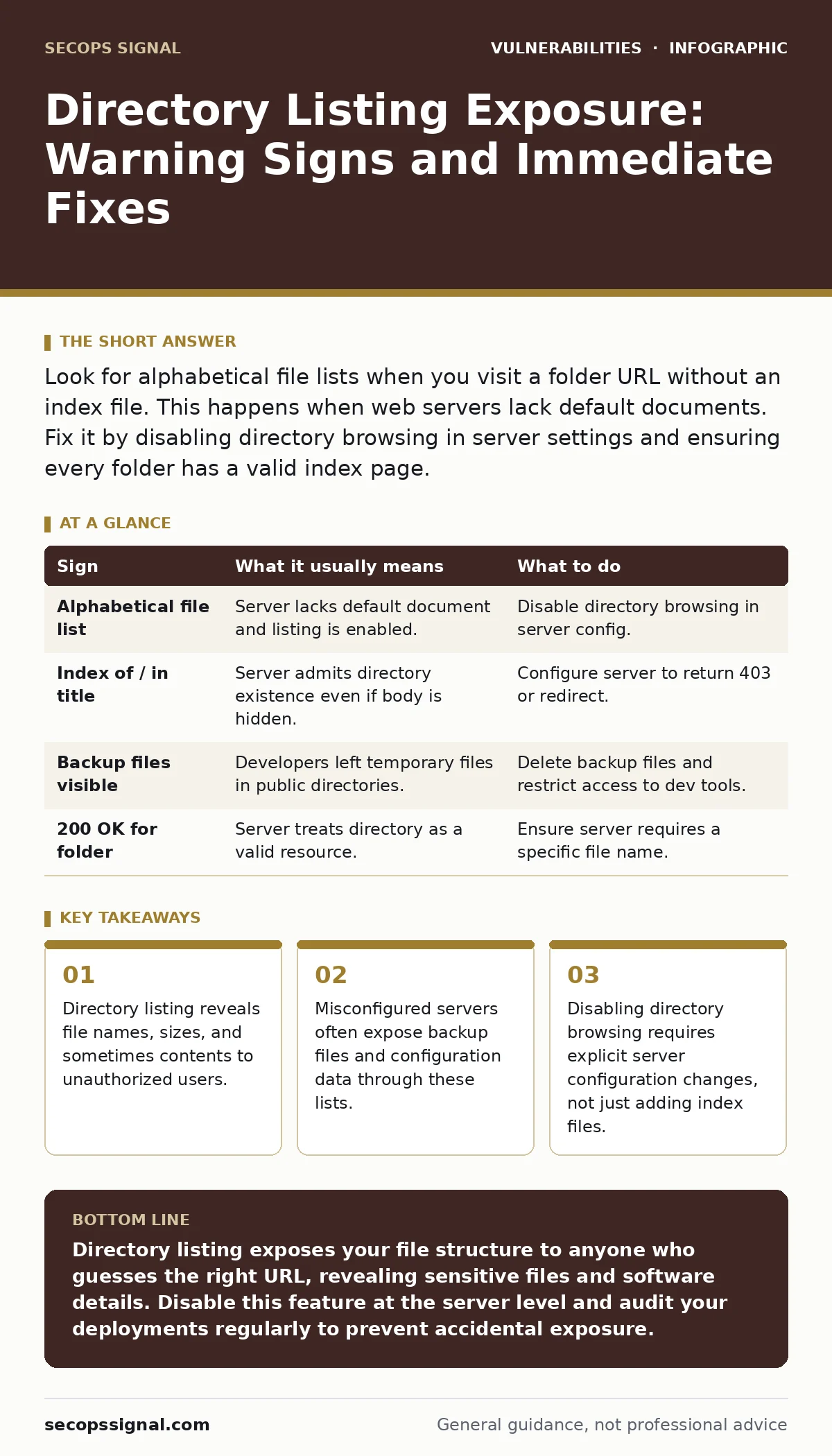
| Sign | What it usually means | What to do |
|---|---|---|
| Alphabetical file list | Server lacks default document and listing is enabled. | Disable directory browsing in server config. |
Index of / in title | Server admits directory existence even if body is hidden. | Configure server to return 403 or redirect. |
| Backup files visible | Developers left temporary files in public directories. | Delete backup files and restrict access to dev tools. |
200 OK for folder | Server treats directory as a valid resource. | Ensure server requires a specific file name. |
Long-Term Prevention Strategies
Preventing directory listing requires a consistent deployment process. Your build pipeline should never upload unnecessary files to the production server. This includes development tools, log files, and backup archives. Use a web root that is separate from your application code.
Integrate security checks into your deployment workflow. Use tools that scan for misconfigurations before code goes live. This catches directory listing issues before they reach users. It also helps identify other common misconfigurations, such as missing HTTP security headers.
Regular audits are necessary. Servers can be reconfigured by accident during updates or maintenance. A routine check of server settings ensures that security controls remain intact. This is part of broader vulnerability scanning practices. It helps maintain a secure posture over time.
Edge Cases and Misconceptions
Some developers believe that hiding file extensions prevents directory listing. This is incorrect. Directory listing shows the file names, regardless of extensions. Hiding extensions might prevent direct access to specific files, but it does not stop the server from listing the directory contents.
Another misconception is that HTTPS prevents directory listing. Encryption protects data in transit, but it does not change how the server handles requests. If the server is configured to list directories, it will do so over HTTPS just as easily as over HTTP. The security of the connection does not fix the server configuration.
Subdomains are often overlooked. A main site might be secure, but a subdomain used for testing or legacy apps might not. Attackers scan subdomains specifically for these weaker points. This is related to subdomain takeover risks. Ensure all subdomains have the same security standards as the main site.
The Human Factor in Configuration
Configuration drift is a real risk. Over time, servers are updated, plugins are added, and settings change. What was secure yesterday might be exposed today. This is why relying on manual checks is insufficient. Automated monitoring is required to detect changes in server behavior.
Developers must be trained on the risks of directory listing. They need to understand that leaving a folder empty is not safe if the server is misconfigured. They should always include a default document or configure the server to reject directory requests. This mindset shift reduces the likelihood of accidental exposure.
Security is not a one-time setup. It is an ongoing process of verification and adjustment. By understanding the signs of directory listing exposure, you can detect and fix issues quickly. This reduces the window of opportunity for attackers. It also builds a culture of security awareness within your team.
Key takeaways
- Directory listing reveals file names, sizes, and sometimes contents to unauthorized users.
- Misconfigured servers often expose backup files and configuration data through these lists.
- Disabling directory browsing requires explicit server configuration changes, not just adding index files.
Directory listing exposes your file structure to anyone who guesses the right URL, revealing sensitive files and software details. Disable this feature at the server level and audit your deployments regularly to prevent accidental exposure.
Frequently asked questions
Does adding an index.html file stop directory listing?
It stops the listing for that specific folder, but it is not a reliable long-term solution. New folders will still be vulnerable if the server configuration allows listing.
Can I use a .htaccess file to fix this?
Yes, on Apache servers, a .htaccess file with `Options -Indexes` can disable directory listing. However, server-wide configuration is more secure and efficient.
Is directory listing a vulnerability on its own?
It is a misconfiguration that leads to information disclosure. While it does not allow code execution, it provides attackers with valuable information to exploit other vulnerabilities.
How do I know if my server is vulnerable?
Try accessing a folder URL that you know does not have an index file. If you see a list of files, your server is vulnerable. Use vulnerability scanning tools to automate this check.
How this guide was produced: written by the SecOps Signal editorial team with AI assistance, checked against the public references listed below, and reviewed when the facts change. See our editorial policy or report an error.